---
title: Why can’t I proceed to the cause analysis stage of the occurrence?
description: Why can’t I proceed to the cause analysis stage of the occurrence?
---
[Skip to content](https://qualiex.forlogic.net/en/why-cant-i-proceed-to-the-cause-analysis-stage-of-the-occurrence#main-content)

Open main navigation
Close main navigation
How can we help you?
- There are no suggestions because the search field is empty.
1. [Qualiex | Knowledge Base](https://qualiex.forlogic.net/en?hsLang=en)
2. [Occurences](https://qualiex.forlogic.net/en/occurences?hsLang=en)
3. [Cause analysis](https://qualiex.forlogic.net/en/occurences?hsLang=en#cause-analysis)
# Why can’t I proceed to the cause analysis stage of the occurrence?
The *Occurrences* module is an essential tool for recording, monitoring, and handling nonconformities, improvements, or any situation that requires tracking within the management system. It allows the configuration of customized workflows, ensuring better control and efficiency in the treatment of occurrences.
### Accessing the module
Click here to learn how to access the *Occurrences* module in Qualiex.
### How to adjust the settings
In the **Settings** tab, you will find the **“Analysis Tools”** option, where you can define whether the cause analysis step will be mandatory or not.
To make any adjustments in the Settings tab, you must have the **“Manage”** permission assigned to your Role.
This permission is defined under **Settings > Roles and Permissions**.
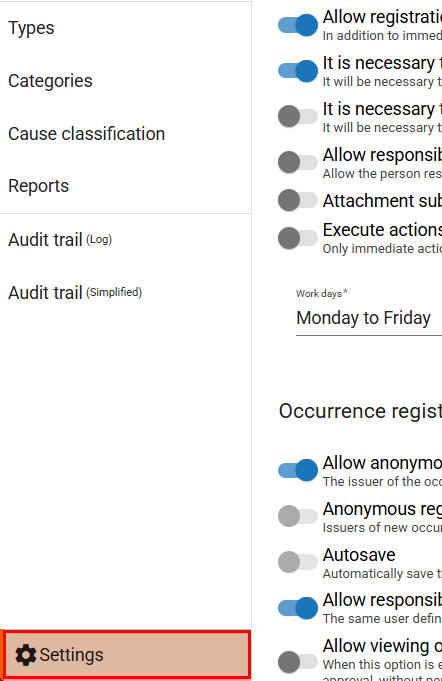
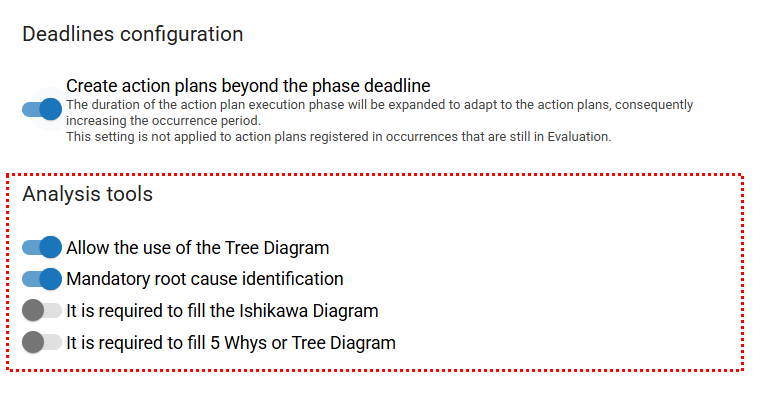
🔎 *Click here to learn more about **how to configure the cause‑analysis tools for occurrences. (placeholder)***
After defining the settings, if you specify that a cause analysis is mandatory, it will not be possible to proceed to the next stage of the treatment process without completing this requirement.
### Occurrence with a mandatory cause‑analysis step
Once the configuration is set and a cause analysis is defined as mandatory, the system will block progression to the next step until the analysis has been properly filled out.
This ensures greater transparency and accuracy throughout the workflow, minimizing the risk of errors or missing information during record management.

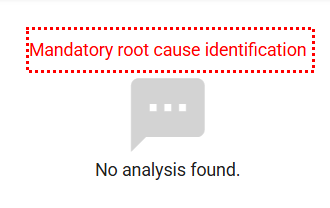
It is important to highlight that any changes made to the settings of the *Occurrences* module will apply exclusively to occurrences registered **after** the date the update is performed. All records created prior to the update will retain the settings that were in effect at the time they were opened and will not be retroactively modified.

From the moment the update is applied, any new occurrence created will already follow the new definitions, ensuring that changes to workflows, mandatory fields, or analysis tools take full effect for all future processes.
This allows you to maintain a consistent historical record of past occurrences, while new records immediately benefit from the improvements implemented.
- [Occurences](https://qualiex.forlogic.net/en/occurences?hsLang=en#main-content)
- [Treating an occurence guide](https://qualiex.forlogic.net/en/occurences?hsLang=en#treating-an-occurence-guide)
- [Register Occurence](https://qualiex.forlogic.net/en/occurences?hsLang=en#register-occurence)
- [Inbox](https://qualiex.forlogic.net/en/occurences?hsLang=en#inbox)
- [Cause analysis](https://qualiex.forlogic.net/en/occurences?hsLang=en#cause-analysis)
- [Action plan elaboration and execution](https://qualiex.forlogic.net/en/occurences?hsLang=en#action-plan-elaboration-and-execution)
- [Effectiveness check](https://qualiex.forlogic.net/en/occurences?hsLang=en#effectiveness-check)
- [Standardization and disclosure](https://qualiex.forlogic.net/en/occurences?hsLang=en#standardization-and-disclosure)
- [Overview](https://qualiex.forlogic.net/en/occurences?hsLang=en#overview)
- [General information](https://qualiex.forlogic.net/en/occurences?hsLang=en#general-information)
- [My Actions](https://qualiex.forlogic.net/en/occurences?hsLang=en#my-actions)
- [Cause classification](https://qualiex.forlogic.net/en/occurences?hsLang=en#cause-classification)
- [Occurences Categories](https://qualiex.forlogic.net/en/occurences?hsLang=en#occurences-categories)
- [Types of occurrences](https://qualiex.forlogic.net/en/occurences?hsLang=en#types-of-occurrences)
- [Module Configurations](https://qualiex.forlogic.net/en/occurences?hsLang=en#module-configurations)
- [Reports](https://qualiex.forlogic.net/en/occurences?hsLang=en#reports)
[](https://qualiex.com/)
[mailto:contato@forlogic.net](mailto:contato@forlogic.net)
Copyright © 2026