---
title: What are Confidential Occurrences and how to register them in the Inbox?
description: What are Confidential Occurrences and how to register them in the Inbox?
---
[Skip to content](https://qualiex.forlogic.net/en/what-are-confidential-occurrences-and-how-to-register-them-in-the-inbox#main-content)

Open main navigation
Close main navigation
How can we help you?
- There are no suggestions because the search field is empty.
1. [Qualiex | Knowledge Base](https://qualiex.forlogic.net/en?hsLang=en)
2. [Occurences](https://qualiex.forlogic.net/en/occurences?hsLang=en)
3. [Inbox](https://qualiex.forlogic.net/en/occurences?hsLang=en#inbox)
# What are Confidential Occurrences and how to register them in the Inbox?
We recognize that, in every organization, there are occurrences classified as *“delicate,” “sensitive,”* or *“critical.”* In many cases, access to this information must be restricted to a specific group, ensuring security for both the company and its employees.
For this reason, we introduced **confidential occurrences**, a feature that allows only users with the appropriate permissions to designate an occurrence as confidential, ensuring that only those directly involved in its handling have access to its details.
### Accessing the module
Click here to learn how to access the *Occurrences* module in Qualiex.
### Registering confidential occurrences
To define occurrences as confidential, the user must have the **“Manage occurrence confidentiality”** permission and the **“Approve all”** permission.
These permissions are configured under **Settings \> Roles and Permissions**.
When accessing the **Inbox** to approve or register occurrences, you can indicate that an occurrence should be marked as confidential. Only the person responsible for the occurrence, the users responsible for each stage, and users with permission to access confidential occurrences will be able to view this type of occurrence.
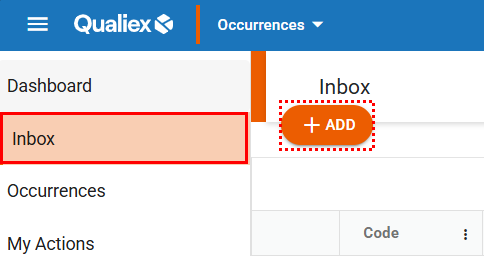
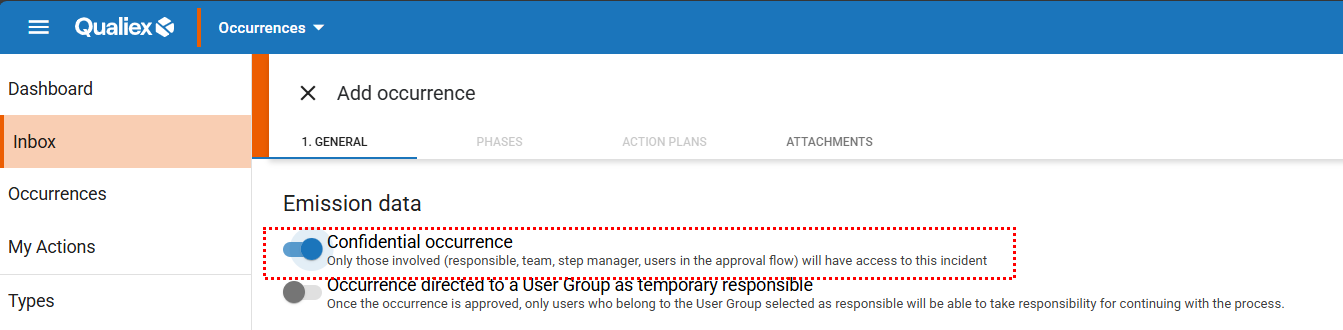
After applying this setting, you can continue normally with the completion and approval of the occurrence or with the registration process. If the user is involved in handling the occurrence, it will appear in the general listing, identified by an icon and a specific indication.
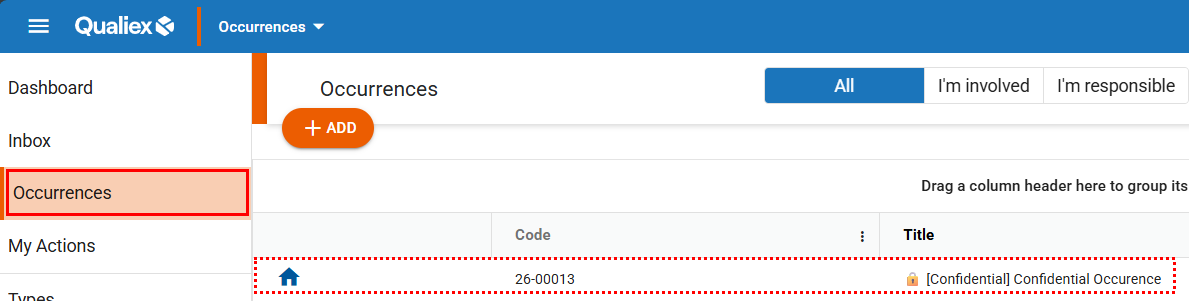
Users who are not involved in handling the occurrence will not be able to view it in the general listing, nor through search filters. Even if they belong to the same database, have an administrator profile, and hold all permissions, if they are not directly involved in the process, the occurrence will remain hidden from them in any search or consultation.
- [Occurences](https://qualiex.forlogic.net/en/occurences?hsLang=en#main-content)
- [Treating an occurence guide](https://qualiex.forlogic.net/en/occurences?hsLang=en#treating-an-occurence-guide)
- [Register Occurence](https://qualiex.forlogic.net/en/occurences?hsLang=en#register-occurence)
- [Inbox](https://qualiex.forlogic.net/en/occurences?hsLang=en#inbox)
- [Cause analysis](https://qualiex.forlogic.net/en/occurences?hsLang=en#cause-analysis)
- [Action plan elaboration and execution](https://qualiex.forlogic.net/en/occurences?hsLang=en#action-plan-elaboration-and-execution)
- [Effectiveness check](https://qualiex.forlogic.net/en/occurences?hsLang=en#effectiveness-check)
- [Standardization and disclosure](https://qualiex.forlogic.net/en/occurences?hsLang=en#standardization-and-disclosure)
- [Overview](https://qualiex.forlogic.net/en/occurences?hsLang=en#overview)
- [General information](https://qualiex.forlogic.net/en/occurences?hsLang=en#general-information)
- [My Actions](https://qualiex.forlogic.net/en/occurences?hsLang=en#my-actions)
- [Cause classification](https://qualiex.forlogic.net/en/occurences?hsLang=en#cause-classification)
- [Occurences Categories](https://qualiex.forlogic.net/en/occurences?hsLang=en#occurences-categories)
- [Types of occurrences](https://qualiex.forlogic.net/en/occurences?hsLang=en#types-of-occurrences)
- [Module Configurations](https://qualiex.forlogic.net/en/occurences?hsLang=en#module-configurations)
- [Reports](https://qualiex.forlogic.net/en/occurences?hsLang=en#reports)
[](https://qualiex.com/)
[mailto:contato@forlogic.net](mailto:contato@forlogic.net)
Copyright © 2026