---
title: How to Edit the General Data of an Occurrence?
description: How to Edit the General Data of an Occurrence?
---
[Skip to content](https://qualiex.forlogic.net/en/v#main-content)

Open main navigation
Close main navigation
How can we help you?
- There are no suggestions because the search field is empty.
1. [Qualiex | Knowledge Base](https://qualiex.forlogic.net/en?hsLang=en)
2. [Occurences](https://qualiex.forlogic.net/en/occurences?hsLang=en)
3. [General information](https://qualiex.forlogic.net/en/occurences?hsLang=en#general-information)
# How to Edit the General Data of an Occurrence?
In Qualiex, it is possible to edit the general information of an already registered occurrence, as long as the user has the appropriate permission.
This functionality allows you to correct or update important details, ensuring that the record accurately reflects the situation being handled.
Below, you will see how to access this option, make the necessary changes, and save the data correctly.
### Accessing the Module
Click here to learn how to access the **Occurrences** module in Qualiex.
### Editing the General Information
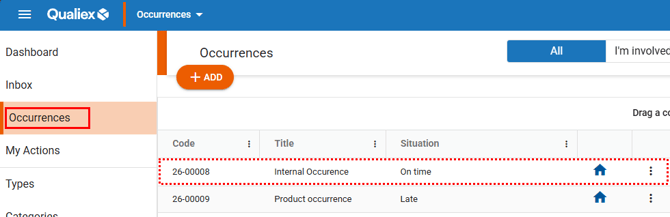
To update the general information of an occurrence, locate and open the desired occurrence in the system.
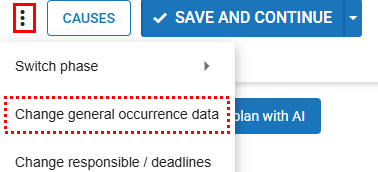
Next, click the **options menu**  located in the upper‑right corner of the occurrence and select **“Change general occurrence data.”**
To edit the general data of an occurrence, the user must have one of the following permissions:**“Edit general data of an occurrence”**,**“Edit All”**, or**“Edit only from my location.”**
These permissions are defined under **Configurations > Roles and Permissions**.
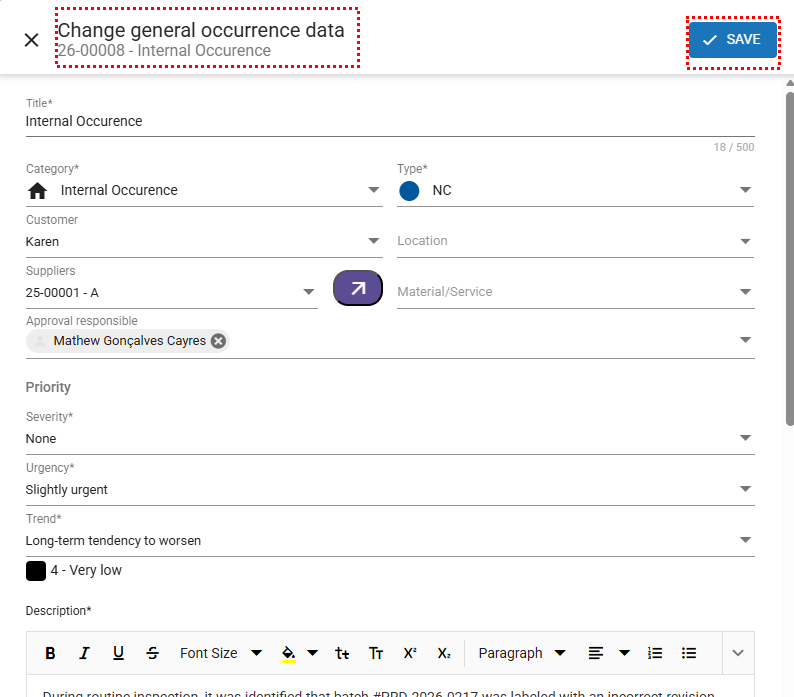
The window containing the previously registered general data for this occurrence will be displayed, allowing you to make the necessary modifications.
After completing the updates to the general information, click **“Save”** to record the changes made.
- [Occurences](https://qualiex.forlogic.net/en/occurences?hsLang=en#main-content)
- [Treating an occurence guide](https://qualiex.forlogic.net/en/occurences?hsLang=en#treating-an-occurence-guide)
- [Register Occurence](https://qualiex.forlogic.net/en/occurences?hsLang=en#register-occurence)
- [Inbox](https://qualiex.forlogic.net/en/occurences?hsLang=en#inbox)
- [Cause analysis](https://qualiex.forlogic.net/en/occurences?hsLang=en#cause-analysis)
- [Action plan elaboration and execution](https://qualiex.forlogic.net/en/occurences?hsLang=en#action-plan-elaboration-and-execution)
- [Effectiveness check](https://qualiex.forlogic.net/en/occurences?hsLang=en#effectiveness-check)
- [Standardization and disclosure](https://qualiex.forlogic.net/en/occurences?hsLang=en#standardization-and-disclosure)
- [Overview](https://qualiex.forlogic.net/en/occurences?hsLang=en#overview)
- [General information](https://qualiex.forlogic.net/en/occurences?hsLang=en#general-information)
- [My Actions](https://qualiex.forlogic.net/en/occurences?hsLang=en#my-actions)
- [Cause classification](https://qualiex.forlogic.net/en/occurences?hsLang=en#cause-classification)
- [Occurences Categories](https://qualiex.forlogic.net/en/occurences?hsLang=en#occurences-categories)
- [Types of occurrences](https://qualiex.forlogic.net/en/occurences?hsLang=en#types-of-occurrences)
- [Module Configurations](https://qualiex.forlogic.net/en/occurences?hsLang=en#module-configurations)
- [Reports](https://qualiex.forlogic.net/en/occurences?hsLang=en#reports)
[](https://qualiex.com/)
[mailto:contato@forlogic.net](mailto:contato@forlogic.net)
Copyright © 2026