
Sometimes, even after all planned actions for an occurrence have been completed, the process remains stuck in the Execution of the Action Plan stage because the stage advance was not done manually.
To make this process more efficient, a feature was created that automatically triggers an advancement to the next stage as soon as the last registered action has its status updated to Completed.
To make this process more efficient, a feature was created that automatically triggers an advancement to the next stage as soon as the last registered action has its status updated to Completed.
Accessing the module
Click here to learn how to access the Occurrences module in Qualiex.
Displayed message
For the message to appear, the user must be:
- the person responsible for the occurrence, or
- the person responsible for the current stage, or
- have the “Edit all” permission, or
- have the “Edit only from my location” permission.
These permissions are defined under Settings > Roles and Permissions.
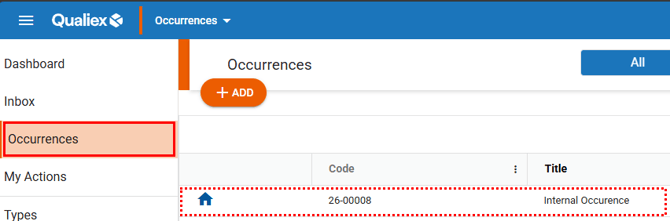
First, select the occurrence in which you want to finalize the action, so the message can be displayed correctly.
With the occurrence open, access the Action Plans tab.
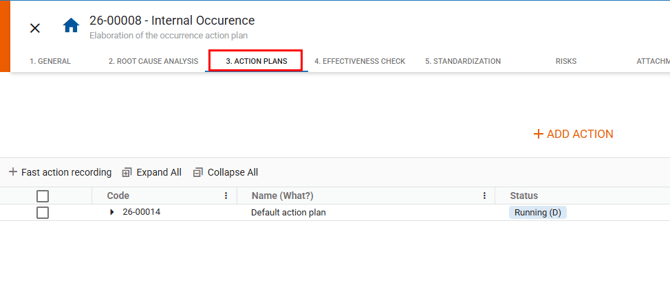
After registering the actions related to the occurrence treatment, proceed to the Execution stage.
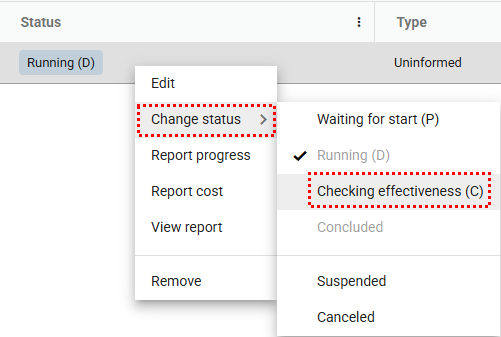
As each action is completed, right‑click it, select “Change status”, and choose “Effectiveness check.”
As each action is completed, right‑click it, select “Change status”, and choose “Effectiveness check.”
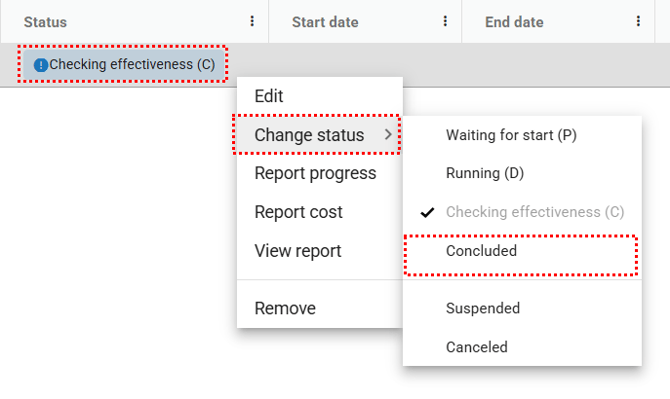
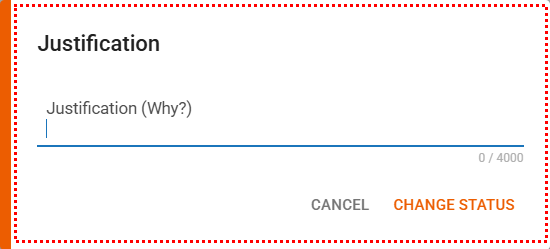
Then, when clicking “Concluded,” the responsible person or verifier must provide a justification for the status change.

When the user clicks “Proceed to next stage,” the system automatically moves the occurrence to the following stage.