---
title: How to View All My Occurrence Actions in Qualiex?
description: How to View All My Occurrence Actions in Qualiex?
---
[Skip to content](https://qualiex.forlogic.net/en/how-to-view-all-my-occurrence-actions-in-qualiex#main-content)

Open main navigation
Close main navigation
How can we help you?
- There are no suggestions because the search field is empty.
1. [Qualiex | Knowledge Base](https://qualiex.forlogic.net/en?hsLang=en)
2. [Occurences](https://qualiex.forlogic.net/en/occurences?hsLang=en)
3. [My Actions](https://qualiex.forlogic.net/en/occurences?hsLang=en#my-actions)
# How to View All My Occurrence Actions in Qualiex?
### 1. Access the Module
Click here to learn how to access the **Occurrences** module in Qualiex.
### 2. Locating My Actions
Whenever an occurrence is registered with actions assigned to collaborators, they can centrally view all the actions they need to perform.
To do this, click the **“My Actions”** tab.
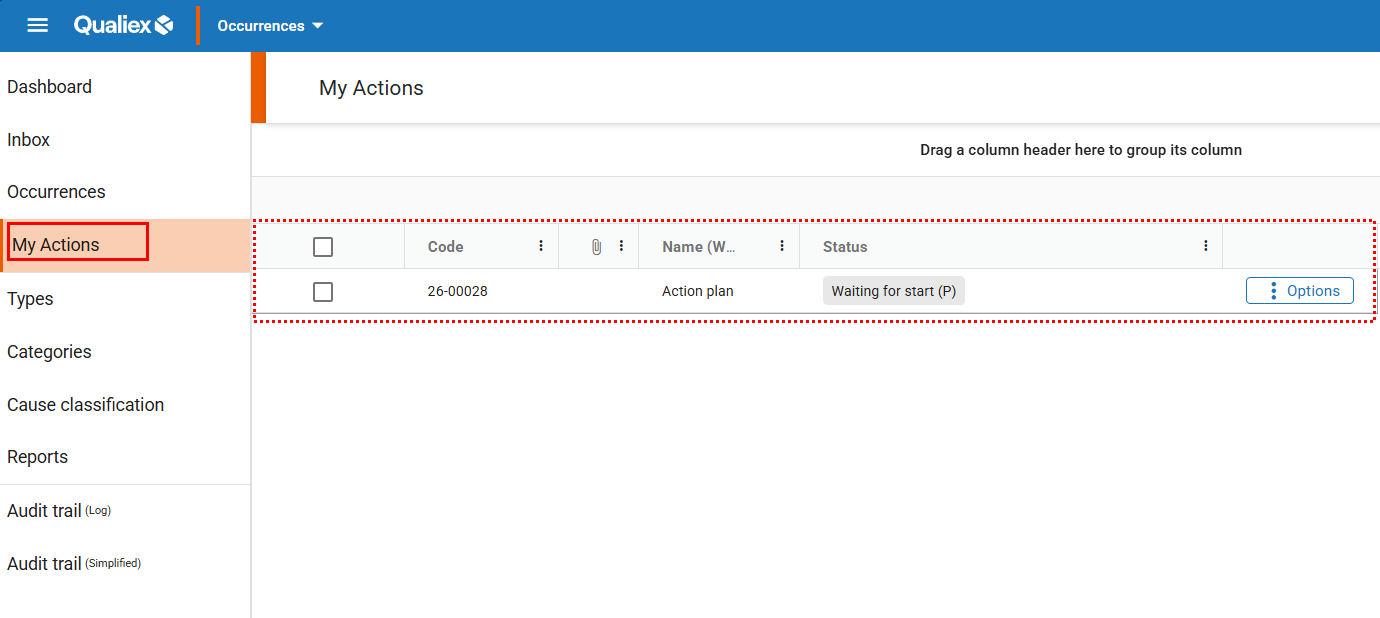
It will be possible to **list all actions that require execution**.
By **right-clicking** on the desired action, you will be able to:
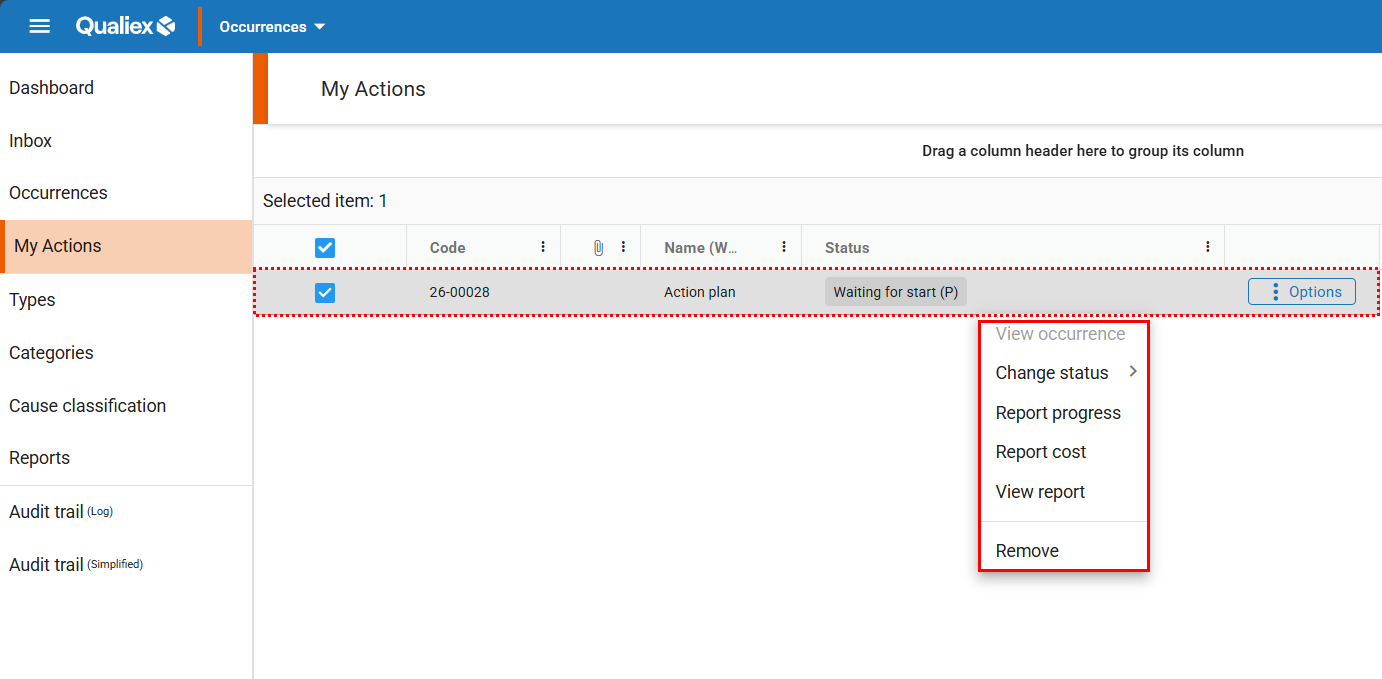
- **View occurrence**: Opens the page with the **general details of the occurrence**.
- **Change status**: Click to view the **step-by-step instructions**.
- **Report progress**: Click to view the **step-by-step instructions**.
- **Report cost**: Click to view the **step-by-step instructions**.
- **View action report**: Displays the **detailed action report**.
#### **See also:**
- How to upload an attachment to an action?
- How to add a comment to an action?
- [Occurences](https://qualiex.forlogic.net/en/occurences?hsLang=en#main-content)
- [Treating an occurence guide](https://qualiex.forlogic.net/en/occurences?hsLang=en#treating-an-occurence-guide)
- [Register Occurence](https://qualiex.forlogic.net/en/occurences?hsLang=en#register-occurence)
- [Inbox](https://qualiex.forlogic.net/en/occurences?hsLang=en#inbox)
- [Cause analysis](https://qualiex.forlogic.net/en/occurences?hsLang=en#cause-analysis)
- [Action plan elaboration and execution](https://qualiex.forlogic.net/en/occurences?hsLang=en#action-plan-elaboration-and-execution)
- [Effectiveness check](https://qualiex.forlogic.net/en/occurences?hsLang=en#effectiveness-check)
- [Standardization and disclosure](https://qualiex.forlogic.net/en/occurences?hsLang=en#standardization-and-disclosure)
- [Overview](https://qualiex.forlogic.net/en/occurences?hsLang=en#overview)
- [General information](https://qualiex.forlogic.net/en/occurences?hsLang=en#general-information)
- [My Actions](https://qualiex.forlogic.net/en/occurences?hsLang=en#my-actions)
- [Cause classification](https://qualiex.forlogic.net/en/occurences?hsLang=en#cause-classification)
- [Occurences Categories](https://qualiex.forlogic.net/en/occurences?hsLang=en#occurences-categories)
- [Types of occurrences](https://qualiex.forlogic.net/en/occurences?hsLang=en#types-of-occurrences)
- [Module Configurations](https://qualiex.forlogic.net/en/occurences?hsLang=en#module-configurations)
- [Reports](https://qualiex.forlogic.net/en/occurences?hsLang=en#reports)
[](https://qualiex.com/)
[mailto:contato@forlogic.net](mailto:contato@forlogic.net)
Copyright © 2026