---
title: How to verify the effectiveness of an occurrence action in Qualiex?
description: How to verify the effectiveness of an occurrence action in Qualiex?
---
[Skip to content](https://qualiex.forlogic.net/en/how-to-verify-the-effectiveness-of-an-occurrence-action-in-qualiex#main-content)

Open main navigation
Close main navigation
How can we help you?
- There are no suggestions because the search field is empty.
1. [Qualiex | Knowledge Base](https://qualiex.forlogic.net/en?hsLang=en)
2. [Occurences](https://qualiex.forlogic.net/en/occurences?hsLang=en)
3. [Action plan elaboration and execution](https://qualiex.forlogic.net/en/occurences?hsLang=en#action-plan-elaboration-and-execution)
# How to verify the effectiveness of an occurrence action in Qualiex?
### 1. Access the module
Click here to learn how to access the *Occurrences* module in Qualiex.
### 2. Locating the occurrence
Click the **Occurrences** tab, locate the desired occurrence, then right‑click it or open the context menu  and select **“View.”**
To view the occurrence, you must be responsible for one of the stages or be part of the involved team.
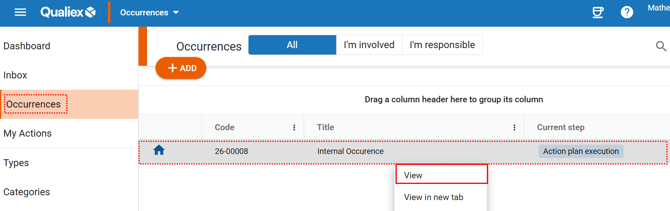
When you click **View**, the system will open the stage that displays the information for the current step: **“Action Plan Execution.”**
The system will then display a screen containing all the actions that must be executed as part of the treatment.
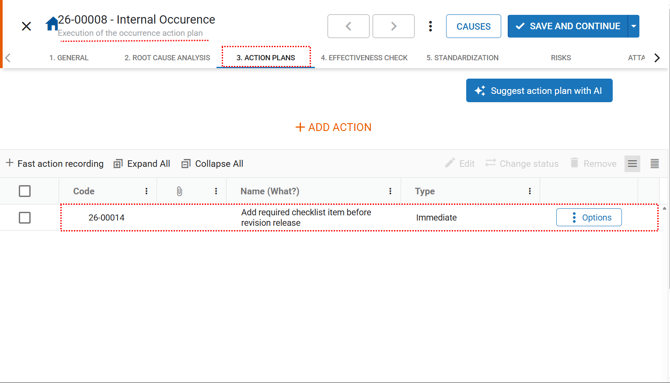
Use the scroll bar at the bottom of the screen to view all information related to the actions.
### 3. Verifying the effectiveness of the action
If the action has a effectiveness checker assigned, **only the effectiveness checker** can complete it. However, before closing the action, a final assessment (statement) must be provided.
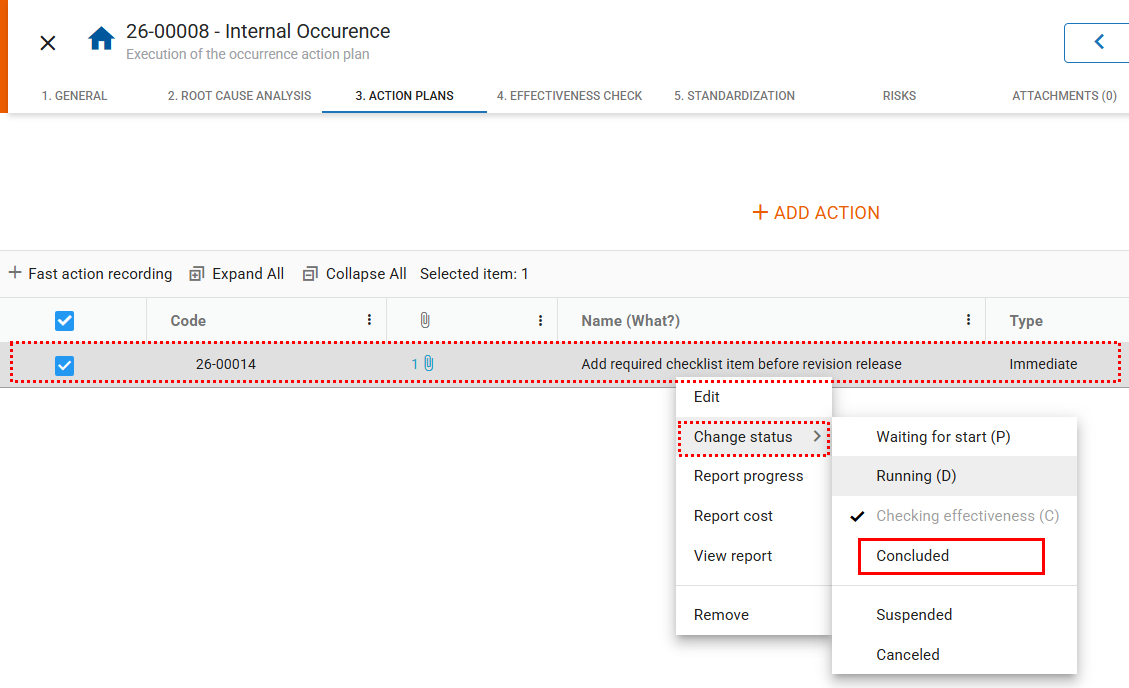
To do this, **right‑click** the desired action, select **“Change status,”** and change the status to **“Concluded.”**
****
A screen will open for you to justify the completion. At this moment, you must describe your assessment regarding the effectiveness verification:
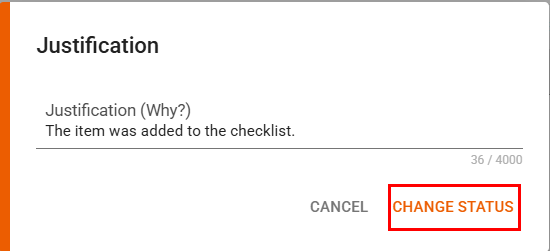
To complete the process, click **“Change Status.”**
If the action was **not effective**, evaluate whether it is necessary to register a **new action** or return this action to the **“Action plan execution”** stage.
- [Occurences](https://qualiex.forlogic.net/en/occurences?hsLang=en#main-content)
- [Treating an occurence guide](https://qualiex.forlogic.net/en/occurences?hsLang=en#treating-an-occurence-guide)
- [Register Occurence](https://qualiex.forlogic.net/en/occurences?hsLang=en#register-occurence)
- [Inbox](https://qualiex.forlogic.net/en/occurences?hsLang=en#inbox)
- [Cause analysis](https://qualiex.forlogic.net/en/occurences?hsLang=en#cause-analysis)
- [Action plan elaboration and execution](https://qualiex.forlogic.net/en/occurences?hsLang=en#action-plan-elaboration-and-execution)
- [Effectiveness check](https://qualiex.forlogic.net/en/occurences?hsLang=en#effectiveness-check)
- [Standardization and disclosure](https://qualiex.forlogic.net/en/occurences?hsLang=en#standardization-and-disclosure)
- [Overview](https://qualiex.forlogic.net/en/occurences?hsLang=en#overview)
- [General information](https://qualiex.forlogic.net/en/occurences?hsLang=en#general-information)
- [My Actions](https://qualiex.forlogic.net/en/occurences?hsLang=en#my-actions)
- [Cause classification](https://qualiex.forlogic.net/en/occurences?hsLang=en#cause-classification)
- [Occurences Categories](https://qualiex.forlogic.net/en/occurences?hsLang=en#occurences-categories)
- [Types of occurrences](https://qualiex.forlogic.net/en/occurences?hsLang=en#types-of-occurrences)
- [Module Configurations](https://qualiex.forlogic.net/en/occurences?hsLang=en#module-configurations)
- [Reports](https://qualiex.forlogic.net/en/occurences?hsLang=en#reports)
[](https://qualiex.com/)
[mailto:contato@forlogic.net](mailto:contato@forlogic.net)
Copyright © 2026