---
title: How to reopen a completed, rejected, or canceled occurrence in Qualiex?
description: How to reopen a completed, rejected, or canceled occurrence in Qualiex?
---
[Skip to content](https://qualiex.forlogic.net/en/how-to-reopen-a-completed-rejected-or-canceled-occurrence-in-qualiex#main-content)

Open main navigation
Close main navigation
How can we help you?
- There are no suggestions because the search field is empty.
1. [Qualiex | Knowledge Base](https://qualiex.forlogic.net/en?hsLang=en)
2. [Occurences](https://qualiex.forlogic.net/en/occurences?hsLang=en)
3. [Treating an occurence guide](https://qualiex.forlogic.net/en/occurences?hsLang=en#treating-an-occurence-guide)
# How to reopen a completed, rejected, or canceled occurrence in Qualiex?
### **Access the module**
Click here to learn how to access the *Occurrences* module in Qualiex.
### **Reopening an occurrence**
Occurrences with the status *completed*, *canceled*, or *rejected* remain “inactive” in the system, meaning that no new entries or changes can be made. If necessary, it is possible to reopen an occurrence to resume its handling.
*To reopen a closed occurrence, you must have the permission **“Change Status of Closed Occurrence”** assigned to your Role. This is defined under **Roles and Permissions > Settings***
Click the **Occurrences** tab, then right‑click the desired occurrence or open the context menu and select **“View.”**
**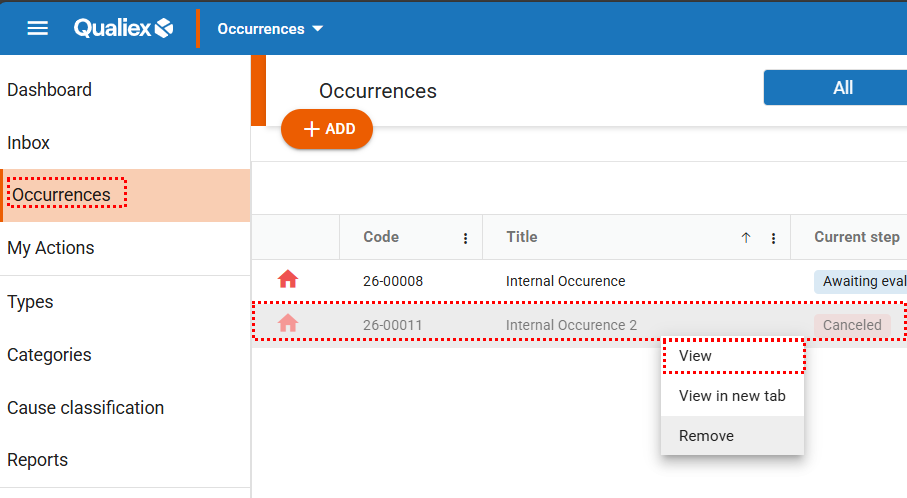**
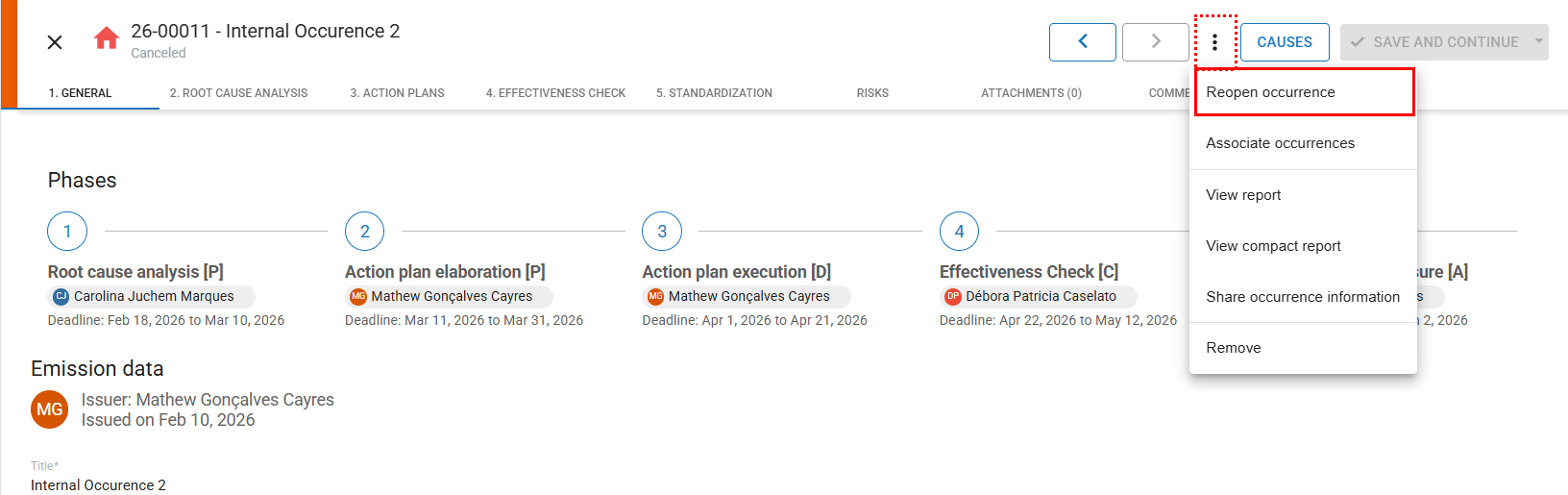
A new screen will open displaying the occurrence details. Click on and then select the option *‘Reopen occurrence’*.
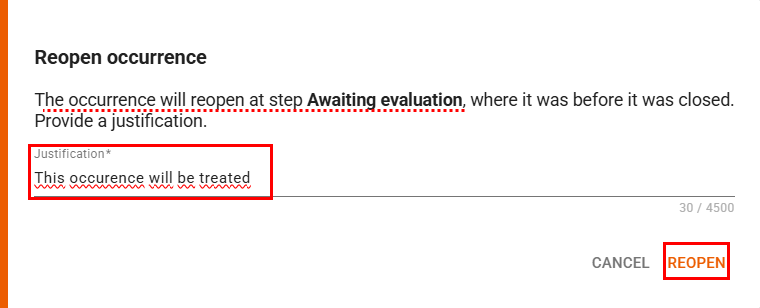
A screen will open showing the stage to which the occurrence will return, and you will be required to enter a justification. This prevents the occurrence from being reopened accidentally.
After entering the justification, click **‘***REOPEN***’**.
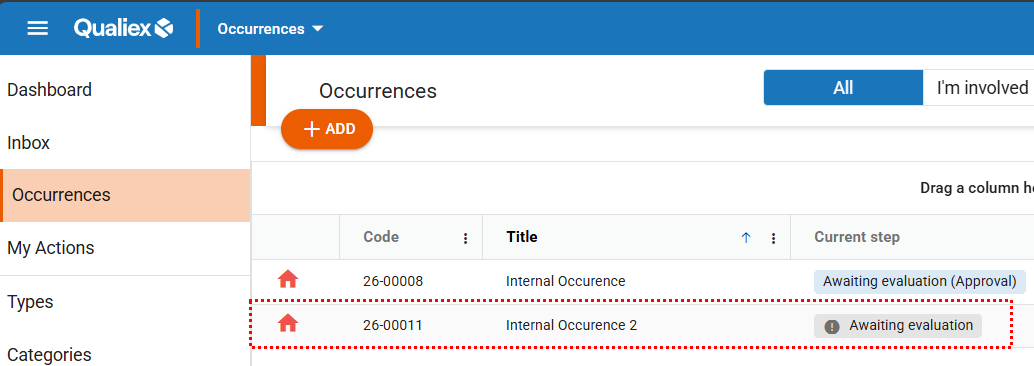
The occurrence will be reopened, allowing you to make changes and continue with the handling process.
*All changes and actions will be recorded in the history log.*
- [Occurences](https://qualiex.forlogic.net/en/occurences?hsLang=en#main-content)
- [Treating an occurence guide](https://qualiex.forlogic.net/en/occurences?hsLang=en#treating-an-occurence-guide)
- [Register Occurence](https://qualiex.forlogic.net/en/occurences?hsLang=en#register-occurence)
- [Inbox](https://qualiex.forlogic.net/en/occurences?hsLang=en#inbox)
- [Cause analysis](https://qualiex.forlogic.net/en/occurences?hsLang=en#cause-analysis)
- [Action plan elaboration and execution](https://qualiex.forlogic.net/en/occurences?hsLang=en#action-plan-elaboration-and-execution)
- [Effectiveness check](https://qualiex.forlogic.net/en/occurences?hsLang=en#effectiveness-check)
- [Standardization and disclosure](https://qualiex.forlogic.net/en/occurences?hsLang=en#standardization-and-disclosure)
- [Overview](https://qualiex.forlogic.net/en/occurences?hsLang=en#overview)
- [General information](https://qualiex.forlogic.net/en/occurences?hsLang=en#general-information)
- [My Actions](https://qualiex.forlogic.net/en/occurences?hsLang=en#my-actions)
- [Cause classification](https://qualiex.forlogic.net/en/occurences?hsLang=en#cause-classification)
- [Occurences Categories](https://qualiex.forlogic.net/en/occurences?hsLang=en#occurences-categories)
- [Types of occurrences](https://qualiex.forlogic.net/en/occurences?hsLang=en#types-of-occurrences)
- [Module Configurations](https://qualiex.forlogic.net/en/occurences?hsLang=en#module-configurations)
- [Reports](https://qualiex.forlogic.net/en/occurences?hsLang=en#reports)
[](https://qualiex.com/)
[mailto:contato@forlogic.net](mailto:contato@forlogic.net)
Copyright © 2026