---
title: How to Move an Occurrence to the Next Step?
description: How to Move an Occurrence to the Next Step?
---
[Skip to content](https://qualiex.forlogic.net/en/how-to-move-an-occurrence-to-the-next-step#main-content)

Open main navigation
Close main navigation
How can we help you?
- There are no suggestions because the search field is empty.
1. [Qualiex | Knowledge Base](https://qualiex.forlogic.net/en?hsLang=en)
2. [Occurences](https://qualiex.forlogic.net/en/occurences?hsLang=en)
3. [General information](https://qualiex.forlogic.net/en/occurences?hsLang=en#general-information)
# How to Move an Occurrence to the Next Step?
If you need to move an occurrence to a different step during the treatment process, it is possible to make this change manually.
### Accessing the Module
Click here to learn how to access the **Occurrences** module in Qualiex.
### **Advancing a Step**
To change a step, select the desired occurrence and click on it to open its details.
To modify a step, you must have either the **“Edit all”** or **“Edit only from my location”** permission.
These permissions are defined under **Configurations \> Roles and Permissions**.
You can only advance or return a step if you are the **overall responsible person** for the occurrence, or the **responsible person for the specific step** (in which case you can only move the step you are responsible for), or a user with the **appropriate permissions**.
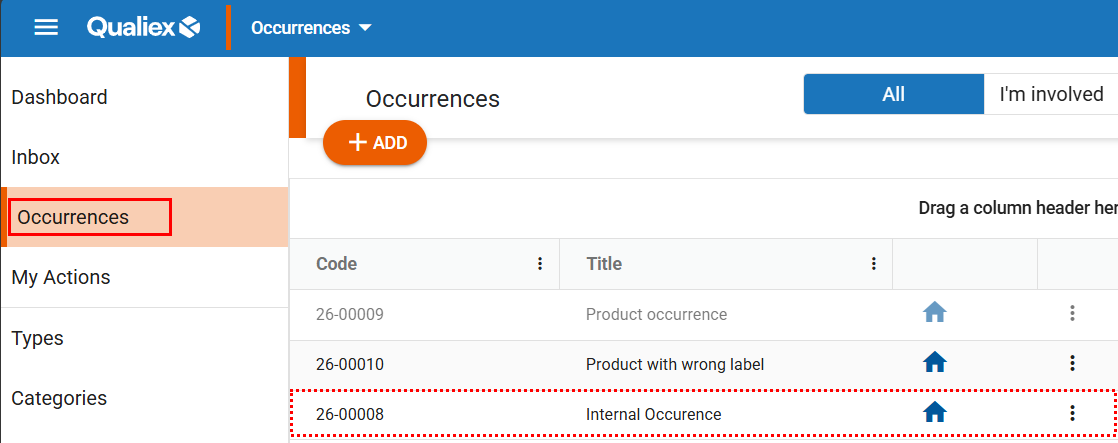
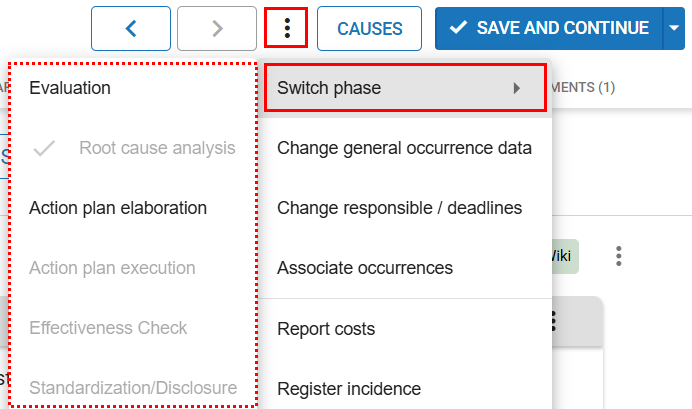
After accessing the occurrence, click the context menu  and select the option “Change step.”
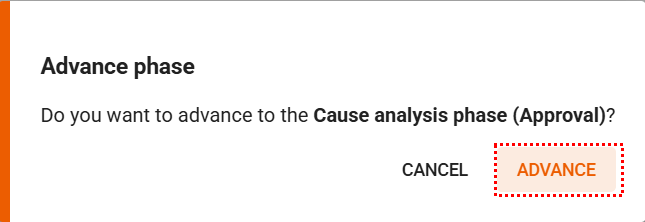
When choosing the step to which you want to move the occurrence, a window will appear asking you to confirm the change by clicking “Next.”
If the cause analysis tools have been set as mandatory in the Occurrences module settings, it will be necessary to complete the required analysis tools before advancing to the next steps.
- [Occurences](https://qualiex.forlogic.net/en/occurences?hsLang=en#main-content)
- [Treating an occurence guide](https://qualiex.forlogic.net/en/occurences?hsLang=en#treating-an-occurence-guide)
- [Register Occurence](https://qualiex.forlogic.net/en/occurences?hsLang=en#register-occurence)
- [Inbox](https://qualiex.forlogic.net/en/occurences?hsLang=en#inbox)
- [Cause analysis](https://qualiex.forlogic.net/en/occurences?hsLang=en#cause-analysis)
- [Action plan elaboration and execution](https://qualiex.forlogic.net/en/occurences?hsLang=en#action-plan-elaboration-and-execution)
- [Effectiveness check](https://qualiex.forlogic.net/en/occurences?hsLang=en#effectiveness-check)
- [Standardization and disclosure](https://qualiex.forlogic.net/en/occurences?hsLang=en#standardization-and-disclosure)
- [Overview](https://qualiex.forlogic.net/en/occurences?hsLang=en#overview)
- [General information](https://qualiex.forlogic.net/en/occurences?hsLang=en#general-information)
- [My Actions](https://qualiex.forlogic.net/en/occurences?hsLang=en#my-actions)
- [Cause classification](https://qualiex.forlogic.net/en/occurences?hsLang=en#cause-classification)
- [Occurences Categories](https://qualiex.forlogic.net/en/occurences?hsLang=en#occurences-categories)
- [Types of occurrences](https://qualiex.forlogic.net/en/occurences?hsLang=en#types-of-occurrences)
- [Module Configurations](https://qualiex.forlogic.net/en/occurences?hsLang=en#module-configurations)
- [Reports](https://qualiex.forlogic.net/en/occurences?hsLang=en#reports)
[](https://qualiex.com/)
[mailto:contato@forlogic.net](mailto:contato@forlogic.net)
Copyright © 2026