---
title: How to mark Recurrence?
description: How to mark Recurrence?
---
[Skip to content](https://qualiex.forlogic.net/en/how-to-mark-recurrence#main-content)

Open main navigation
Close main navigation
How can we help you?
- There are no suggestions because the search field is empty.
1. [Qualiex | Knowledge Base](https://qualiex.forlogic.net/en?hsLang=en)
2. [Occurences](https://qualiex.forlogic.net/en/occurences?hsLang=en)
3. [Treating an occurence guide](https://qualiex.forlogic.net/en/occurences?hsLang=en#treating-an-occurence-guide)
# How to mark Recurrence?
Even after addressing the root cause of an occurrence and completing the action plan, the issue may happen again. In such cases, you can mark the recurrence to record this history and assess whether a new action plan is needed.
### Accessing the module
Click here to learn how to access the **Occurrences** module in Qualiex.(placeholder)
### **Marking a recurrence**
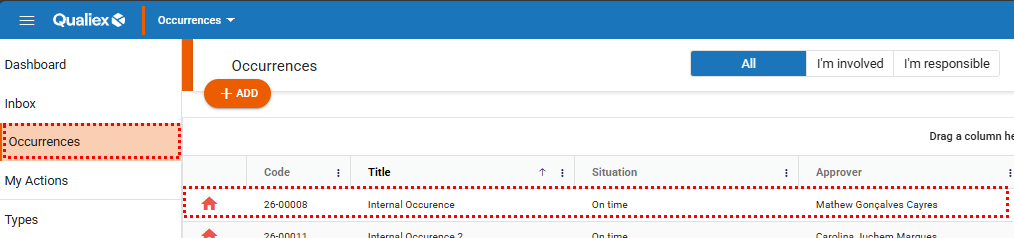
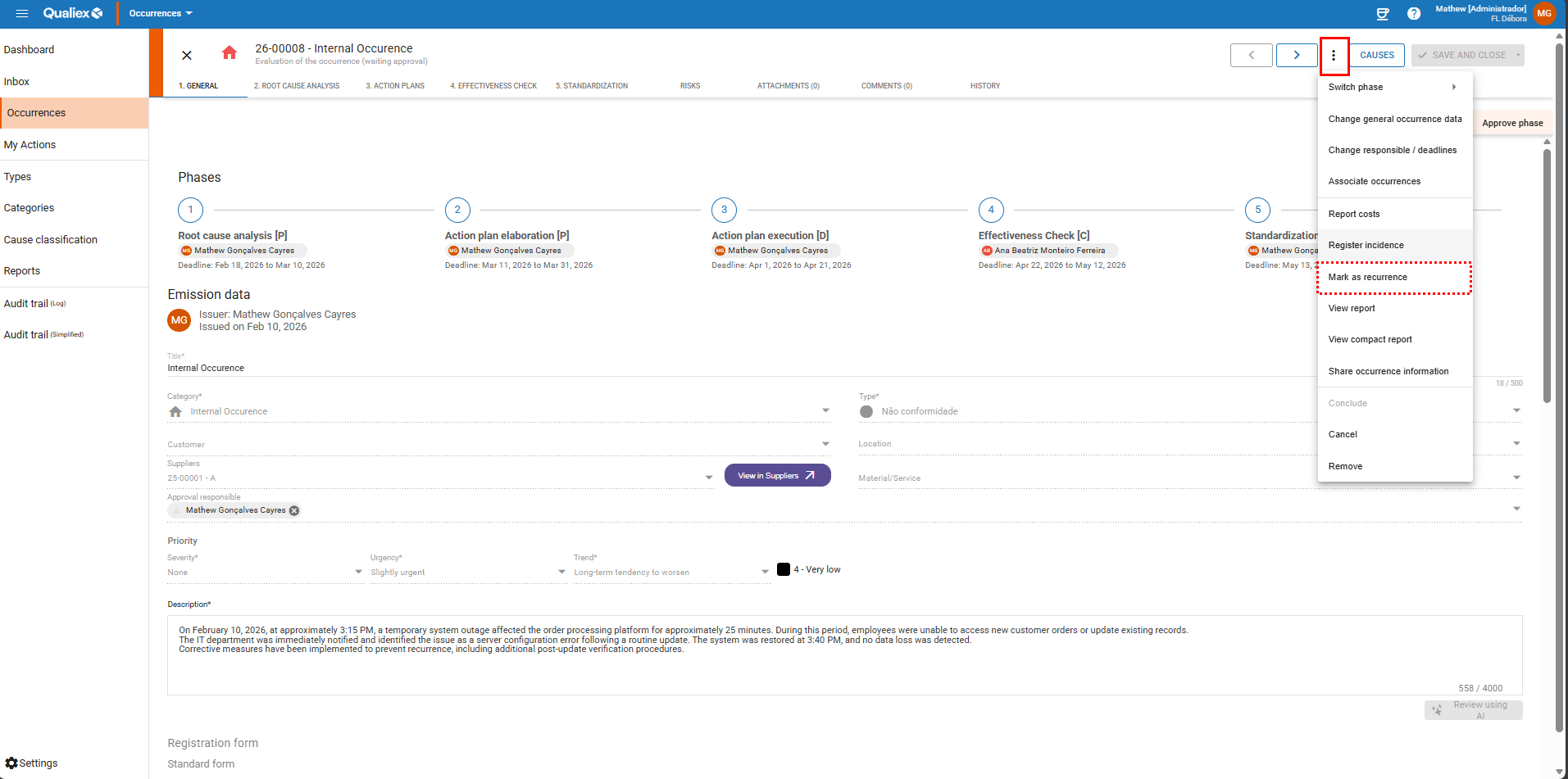
To mark a recurrence, open the desired occurrence and click **“Mark recurrence.”**
Remember: the linked occurrence must have a **Completed** status.
*To mark a recurrence, you must be either the **person responsible for the occurrence** or the **person responsible for the current step**.*
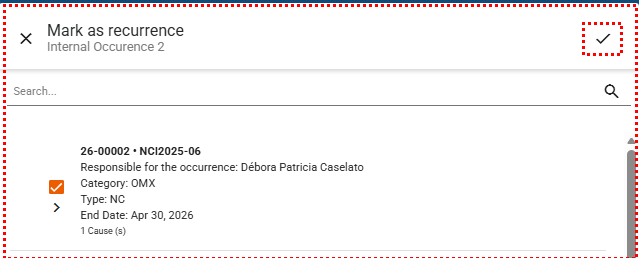
A screen will be displayed for you to select the desired nonconformity, which must be in *standardization* or *completed* status. Select the appropriate nonconformity and click to save and register the recurrence.
When accessing a nonconformity marked as a recurrence, go to the General tab and scroll down to view the original nonconformity to which it is linked as a recurrent case, as well as the corresponding occurrences.
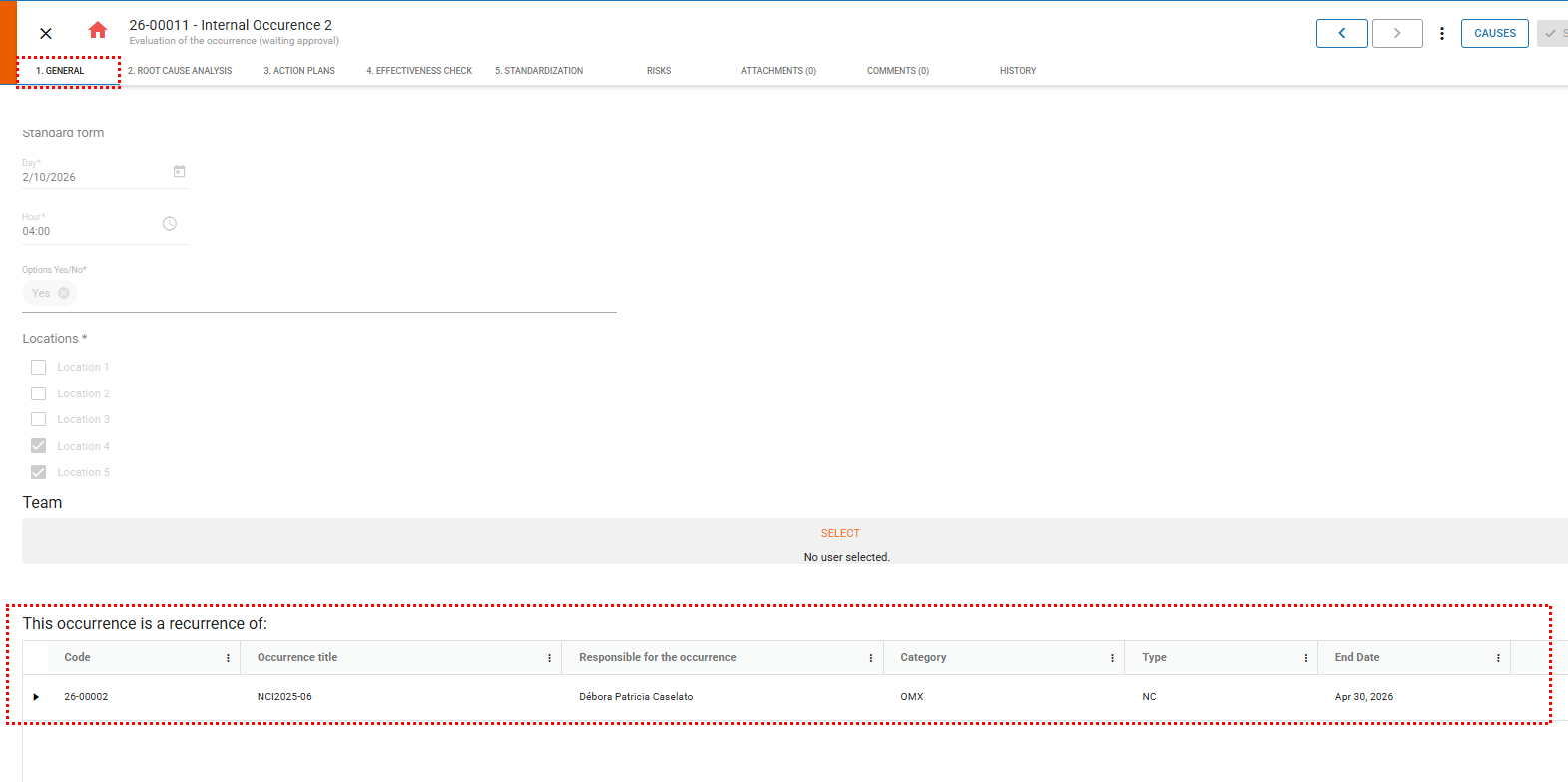
The recurrence record is also available in the nonconformity’s history for monitoring purposes.

- [Occurences](https://qualiex.forlogic.net/en/occurences?hsLang=en#main-content)
- [Treating an occurence guide](https://qualiex.forlogic.net/en/occurences?hsLang=en#treating-an-occurence-guide)
- [Register Occurence](https://qualiex.forlogic.net/en/occurences?hsLang=en#register-occurence)
- [Inbox](https://qualiex.forlogic.net/en/occurences?hsLang=en#inbox)
- [Cause analysis](https://qualiex.forlogic.net/en/occurences?hsLang=en#cause-analysis)
- [Action plan elaboration and execution](https://qualiex.forlogic.net/en/occurences?hsLang=en#action-plan-elaboration-and-execution)
- [Effectiveness check](https://qualiex.forlogic.net/en/occurences?hsLang=en#effectiveness-check)
- [Standardization and disclosure](https://qualiex.forlogic.net/en/occurences?hsLang=en#standardization-and-disclosure)
- [Overview](https://qualiex.forlogic.net/en/occurences?hsLang=en#overview)
- [General information](https://qualiex.forlogic.net/en/occurences?hsLang=en#general-information)
- [My Actions](https://qualiex.forlogic.net/en/occurences?hsLang=en#my-actions)
- [Cause classification](https://qualiex.forlogic.net/en/occurences?hsLang=en#cause-classification)
- [Occurences Categories](https://qualiex.forlogic.net/en/occurences?hsLang=en#occurences-categories)
- [Types of occurrences](https://qualiex.forlogic.net/en/occurences?hsLang=en#types-of-occurrences)
- [Module Configurations](https://qualiex.forlogic.net/en/occurences?hsLang=en#module-configurations)
- [Reports](https://qualiex.forlogic.net/en/occurences?hsLang=en#reports)
[](https://qualiex.com/)
[mailto:contato@forlogic.net](mailto:contato@forlogic.net)
Copyright © 2026