---
title: How to Duplicate an Occurrence Type in Qualiex?
description: How to Duplicate an Occurrence Type in Qualiex?
---
[Skip to content](https://qualiex.forlogic.net/en/how-to-duplicate-an-occurrence-type-in-qualiex#main-content)

Open main navigation
Close main navigation
How can we help you?
- There are no suggestions because the search field is empty.
1. [Qualiex | Knowledge Base](https://qualiex.forlogic.net/en?hsLang=en)
2. [Occurences](https://qualiex.forlogic.net/en/occurences?hsLang=en)
3. [Types of occurrences](https://qualiex.forlogic.net/en/occurences?hsLang=en#types-of-occurrences)
# How to Duplicate an Occurrence Type in Qualiex?
The **duplicate occurrence type** feature was created to make the process faster and more practical.
When using this function, part of the information from the original type is automatically copied into the new record, avoiding the need to fill everything out from scratch.
You only need to review the copied data and adjust what needs to be updated — saving time and reducing the risk of errors.
### 1. Access the Module
Click here to learn how to access the **Occurrences** module in Qualiex.
### 2. Duplicating the Type
Click on the **“Types”** tab, then right‑click the desired type or open the **context menu**  and select **“Duplicate.”**
To duplicate a type, you must have the **Manage Types, Categories, and Cause Classifications** permission, defined under **Configurations > Roles and Permissions**.
Click here to learn how to configure permissions for the Occurrences module.
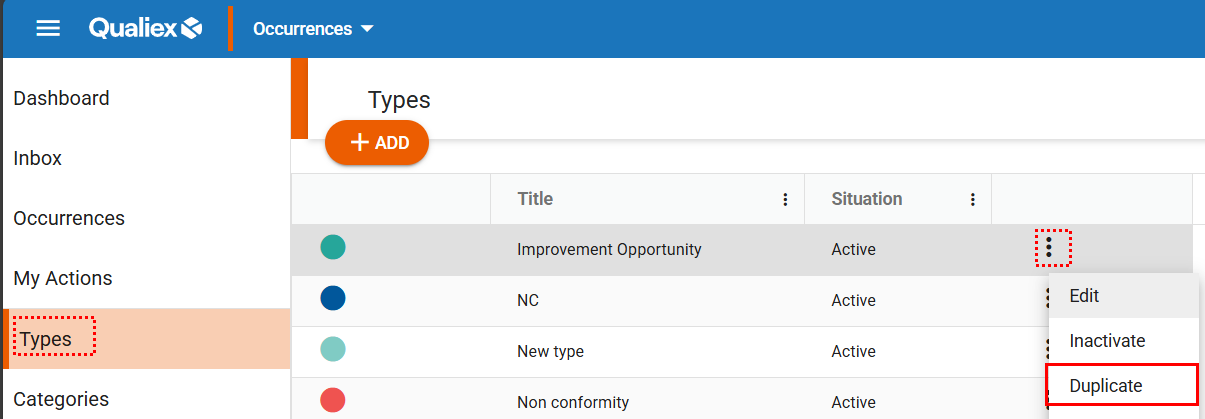
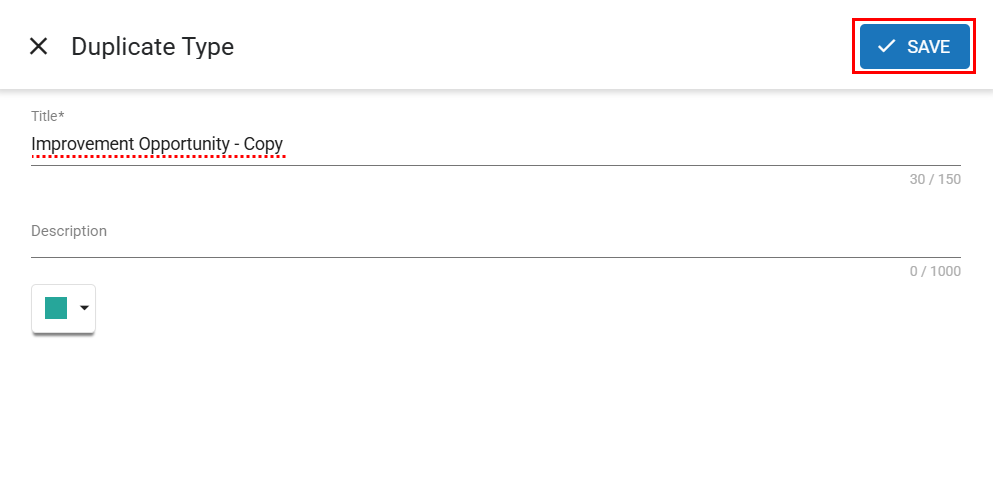
When selecting the “Duplicate” option, a window will open allowing you to make changes to the copied record.
In the title, the system will automatically add the label **“- Copy”** after the original type name.
After making the necessary changes, click .
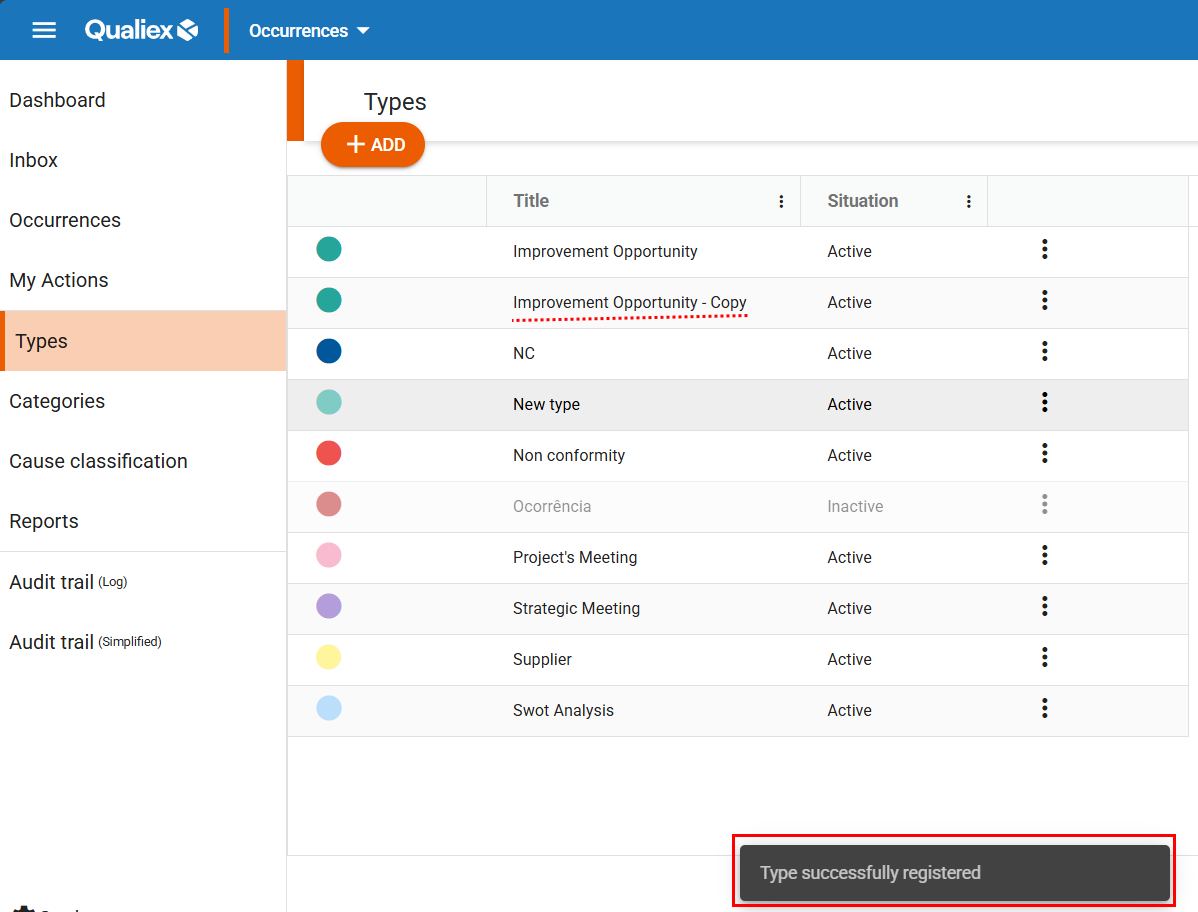
After clicking “Save,” the type will be registered and a confirmation message will be displayed:
### **See Also:**
- How to access the Qualiex Occurrences module?
- Types and Categories of occurrences in Qualiex: what they are and what they are used for
- How to register a type?
- How to edit a type?
- How to remove a type?
- How to deactivate and activate an Occurrence Type in Qualiex?
- [Occurences](https://qualiex.forlogic.net/en/occurences?hsLang=en#main-content)
- [Treating an occurence guide](https://qualiex.forlogic.net/en/occurences?hsLang=en#treating-an-occurence-guide)
- [Register Occurence](https://qualiex.forlogic.net/en/occurences?hsLang=en#register-occurence)
- [Inbox](https://qualiex.forlogic.net/en/occurences?hsLang=en#inbox)
- [Cause analysis](https://qualiex.forlogic.net/en/occurences?hsLang=en#cause-analysis)
- [Action plan elaboration and execution](https://qualiex.forlogic.net/en/occurences?hsLang=en#action-plan-elaboration-and-execution)
- [Effectiveness check](https://qualiex.forlogic.net/en/occurences?hsLang=en#effectiveness-check)
- [Standardization and disclosure](https://qualiex.forlogic.net/en/occurences?hsLang=en#standardization-and-disclosure)
- [Overview](https://qualiex.forlogic.net/en/occurences?hsLang=en#overview)
- [General information](https://qualiex.forlogic.net/en/occurences?hsLang=en#general-information)
- [My Actions](https://qualiex.forlogic.net/en/occurences?hsLang=en#my-actions)
- [Cause classification](https://qualiex.forlogic.net/en/occurences?hsLang=en#cause-classification)
- [Occurences Categories](https://qualiex.forlogic.net/en/occurences?hsLang=en#occurences-categories)
- [Types of occurrences](https://qualiex.forlogic.net/en/occurences?hsLang=en#types-of-occurrences)
- [Module Configurations](https://qualiex.forlogic.net/en/occurences?hsLang=en#module-configurations)
- [Reports](https://qualiex.forlogic.net/en/occurences?hsLang=en#reports)
[](https://qualiex.com/)
[mailto:contato@forlogic.net](mailto:contato@forlogic.net)
Copyright © 2026