---
title: How to Remove a Cause Classification in Qualiex?
description: How to Remove a Cause Classification in Qualiex?
---
[Skip to content](https://qualiex.forlogic.net/en/how-to-delete-a-cause-classification-in-qualiex#main-content)

Open main navigation
Close main navigation
How can we help you?
- There are no suggestions because the search field is empty.
1. [Qualiex | Knowledge Base](https://qualiex.forlogic.net/en?hsLang=en)
2. [Occurences](https://qualiex.forlogic.net/en/occurences?hsLang=en)
3. [Cause classification](https://qualiex.forlogic.net/en/occurences?hsLang=en#cause-classification)
# How to Remove a Cause Classification in Qualiex?
In some cases, a previously registered cause classification in the Occurrences module may no longer be adequate due to changes or adjustments in processes. In this situation, it is possible to remove this classification.
**ATTENTION:**
It is recommended to **deactivate** the Cause Classification instead of removing it, as deleted information cannot be restored.
### 1. Access the Module
Click here to learn how to access the **Occurrences** module in Qualiex.
### **2. Removing the Cause Classification**
Click the **“Cause Classification”** tab, then right‑click the desired classification or open the context menu and select **“Remove.”**
To delete a classification, you must have the **“Manage types, categories, and cause classifications”** permission, defined under **Configurations > Roles and Permissions**.
Click here to learn how to configure permissions for the Occurrences module.
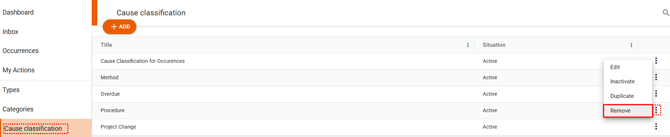
When selecting the **“Remove”** option, a window will open where you must confirm the deletion of the classification, acknowledging the message that the classification cannot be recovered.
To proceed with the deletion, click , or click **Cancel** if you decide not to continue.
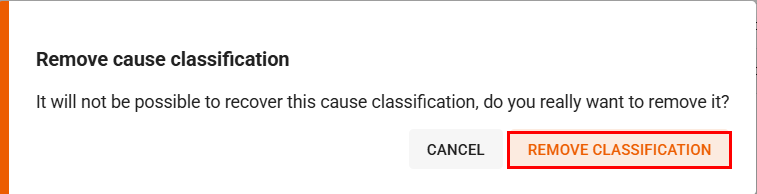
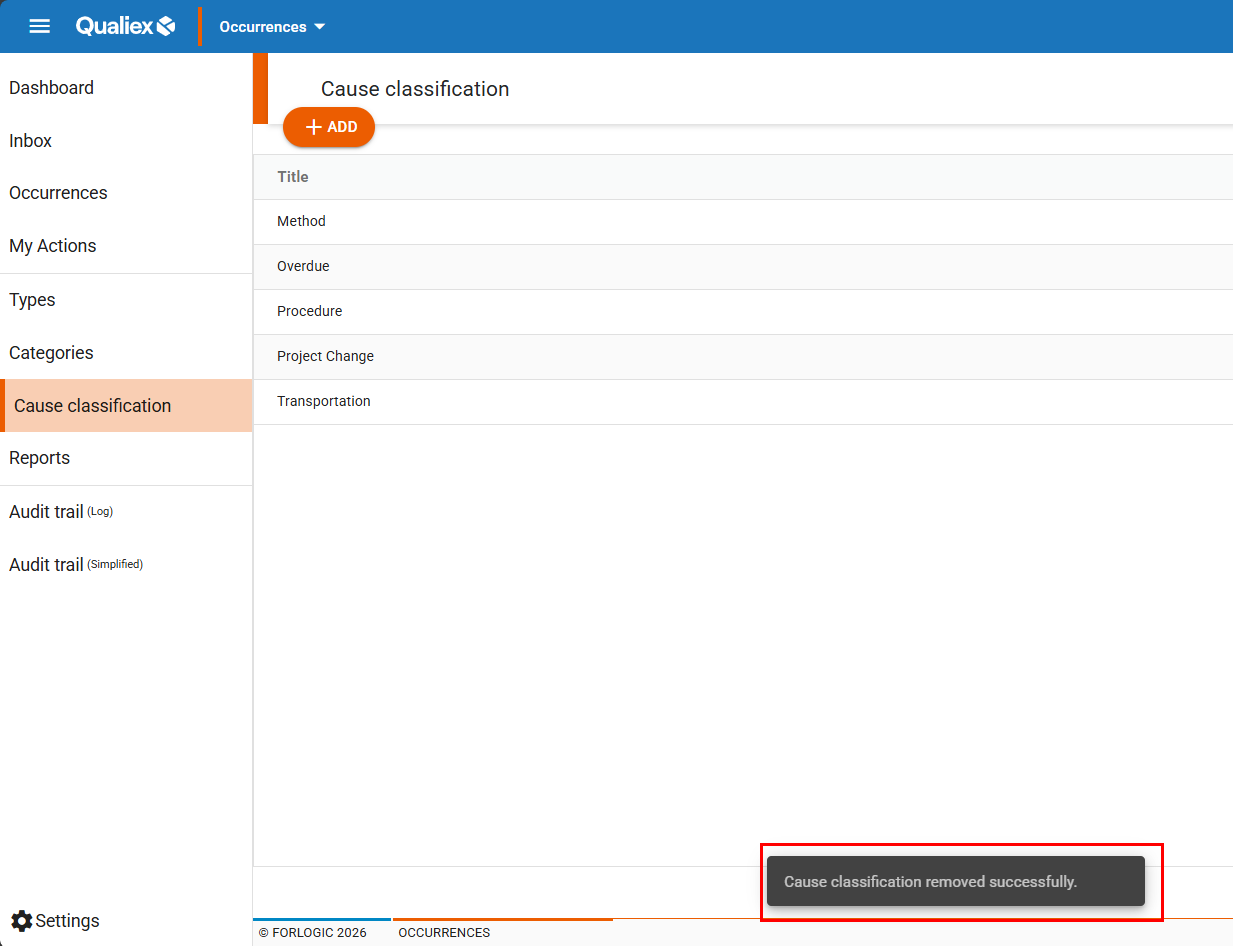
After clicking **“Remove Classification”**, it will no longer be displayed on the screen, it will not be possible to find it in the system, and a confirmation message of the deletion will appear:
### **3. It is not possible to delete classifications that are already in use**
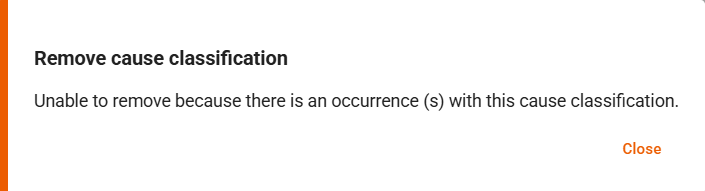
It is not possible to delete cause classifications that are linked to existing occurrences.
Use the **“Inactivate”** option for classifications that are already in use.
Click here to learn how to deactivate and activate a cause classification.
### **See also:**
- **How to register a cause classification?**
- **How to edit a cause classification?**
- **How to duplicate a cause classification?**
- **How to deactivate and activate a cause classification?**
- [Occurences](https://qualiex.forlogic.net/en/occurences?hsLang=en#main-content)
- [Treating an occurence guide](https://qualiex.forlogic.net/en/occurences?hsLang=en#treating-an-occurence-guide)
- [Register Occurence](https://qualiex.forlogic.net/en/occurences?hsLang=en#register-occurence)
- [Inbox](https://qualiex.forlogic.net/en/occurences?hsLang=en#inbox)
- [Cause analysis](https://qualiex.forlogic.net/en/occurences?hsLang=en#cause-analysis)
- [Action plan elaboration and execution](https://qualiex.forlogic.net/en/occurences?hsLang=en#action-plan-elaboration-and-execution)
- [Effectiveness check](https://qualiex.forlogic.net/en/occurences?hsLang=en#effectiveness-check)
- [Standardization and disclosure](https://qualiex.forlogic.net/en/occurences?hsLang=en#standardization-and-disclosure)
- [Overview](https://qualiex.forlogic.net/en/occurences?hsLang=en#overview)
- [General information](https://qualiex.forlogic.net/en/occurences?hsLang=en#general-information)
- [My Actions](https://qualiex.forlogic.net/en/occurences?hsLang=en#my-actions)
- [Cause classification](https://qualiex.forlogic.net/en/occurences?hsLang=en#cause-classification)
- [Occurences Categories](https://qualiex.forlogic.net/en/occurences?hsLang=en#occurences-categories)
- [Types of occurrences](https://qualiex.forlogic.net/en/occurences?hsLang=en#types-of-occurrences)
- [Module Configurations](https://qualiex.forlogic.net/en/occurences?hsLang=en#module-configurations)
- [Reports](https://qualiex.forlogic.net/en/occurences?hsLang=en#reports)
[](https://qualiex.com/)
[mailto:contato@forlogic.net](mailto:contato@forlogic.net)
Copyright © 2026