
We understand that, in some scenarios, certain information is essential for specific processes, while in others it may not be as relevant. With this in mind, Qualiex allows these settings to be adjusted according to each organization’s reality, ensuring better alignment with the Quality Management System.
1. Access the module
2. Locating the Occurrences module settings
It is located in the lower-left corner of the screen, as the last tab.
3. Understanding the action plan settings
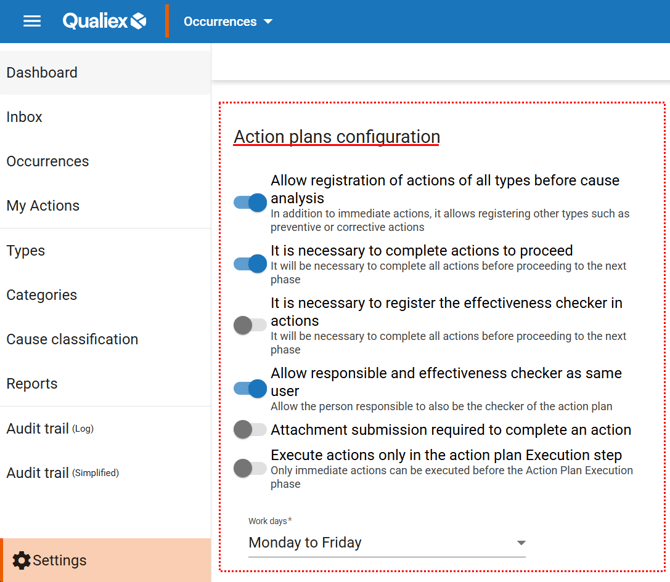
This group of settings is related to the definition and management of action plans for occurrences. In other words, this is where you can customize the behavior rules of action plans, ensuring they align with the organization’s Quality Management System requirements and operational practices.
 indicates that the setting is enabled. Settings identified as disabled
  are turned off.
To enable or disable a setting, simply click the corresponding toggle.
-
Allow registering actions of all types before cause analysis: If this option is enabled, when an occurrence is created it will be possible to create and classify actions beyond Immediate Actions, such as Corrective Actions, Preventive Actions, or Improvement Opportunities, even before completing the root cause analysis.
-
Require all actions to be completed before moving to effectiveness check: There may be situations in which an occurrence can move forward to the Effectiveness Check stage.
If this setting is disabled at the time the occurrence is created, it will only be possible to advance from the Action Plan Execution stage once all actions have been completed.
When your occurrence reaches the effectiveness check stage, should there still be actions in progress?
If the answer is no, our recommendation is to keep this option enabled, ensuring that occurrences only advance to effectiveness check when there are no pending action plan items.
-
Mandatory verifier for actions: The verifier is the user responsible for evaluating whether the action was executed as required before it is formally closed.
Assigning a verifier to an action is optional.
-
Allow the action responsible and verifier to be the same user: In most cases, the user assigned as the action responsible will not be the same user responsible for effectiveness check. However, there may be scenarios in which the action owner can and should also act as the verifier. This setting allows both roles to be assigned to the same user.
-
Require attachment submission to close an action: Attachments such as images and documents can be uploaded as evidence of action execution.
If required, this setting can be enabled to make attachment submission mandatory for action closure.
-
Allow actions to be executed outside the Action Plan Execution stage: This setting allows actions to be executed even if the occurrence is not officially in the Action Plan Execution stage, providing greater flexibility in treatment.
For example, Immediate Actions that must be executed and recorded as soon as possible.
-
Working days: This setting defines which days will be considered when calculating action deadlines.
-
- Monday to Friday: Use when occurrence treatment considers only weekdays.
- Except Sundays: Select this option if your organization considers all days from Monday to Saturday, excluding Sundays.
- All days: Enable to calculate deadlines using calendar days.
4. Understanding deadline settings
The setting that allows creating action plans beyond the stage deadline enables the registration of actions with deadlines longer than those defined in the category.
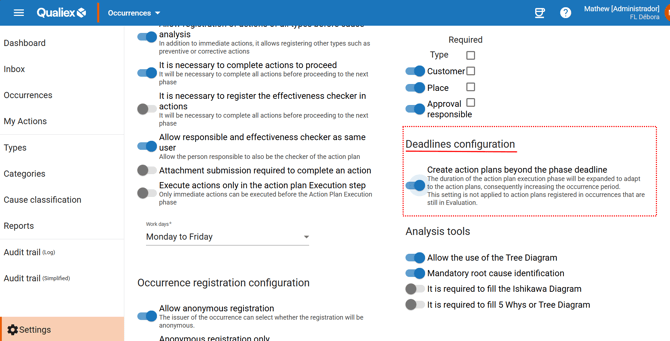
 .
.