---
title: How to deepen the cause analysis of an occurrence using the 5 Whys in Qualiex?
description: How to deepen the cause analysis of an occurrence using the 5 Whys in Qualiex?
---
[Skip to content](https://qualiex.forlogic.net/en/how-to-deepen-the-cause-analysis-of-an-occurrence-using-the-5-whys-in-qualiex#main-content)

Open main navigation
Close main navigation
How can we help you?
- There are no suggestions because the search field is empty.
1. [Qualiex | Knowledge Base](https://qualiex.forlogic.net/en?hsLang=en)
2. [Occurences](https://qualiex.forlogic.net/en/occurences?hsLang=en)
3. [Cause analysis](https://qualiex.forlogic.net/en/occurences?hsLang=en#cause-analysis)
# How to deepen the cause analysis of an occurrence using the 5 Whys in Qualiex?
### 1. Access the module
Click here to learn how to access the *Occurrences* module in Qualiex.
### 2. Locating the occurrence
Click the **Occurrences** tab, then right‑click the desired occurrence or open the context menu  and select **“View.”**
To perform the cause analysis of an occurrence, you must be either the person responsible for the occurrence or the person responsible for the cause‑analysis stage.
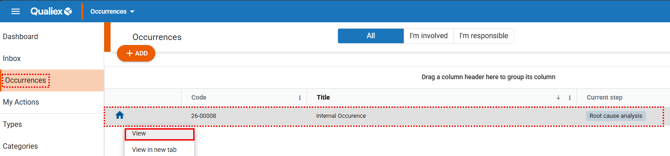
When you open the occurrence, the system automatically directs you to the current step that needs to be completed
### **3. Adding the cause‑analysis tool**
In the **Cause Analysis** step, click **“Causes”** to view the possible causes and root causes that have been identified.

A screen will open showing the possible causes and root causes found:
**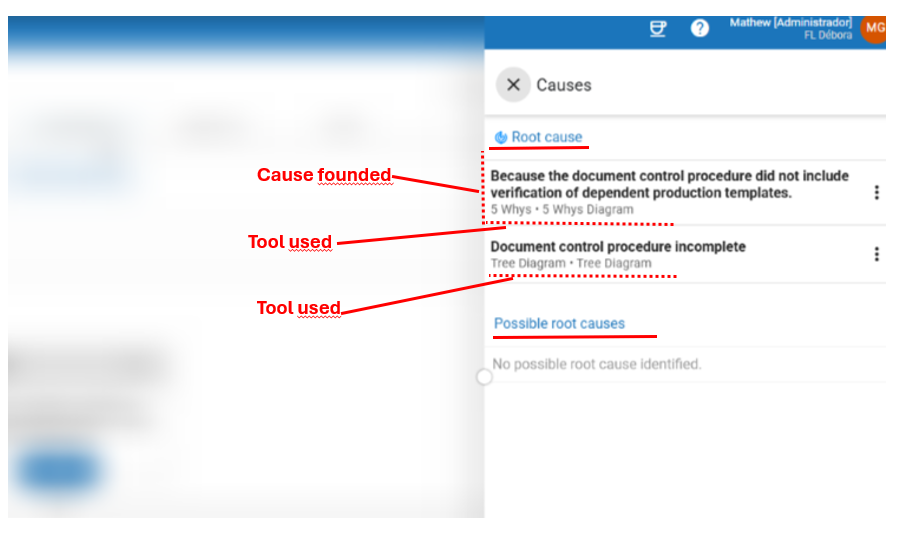**
To deepen the analysis of a cause:
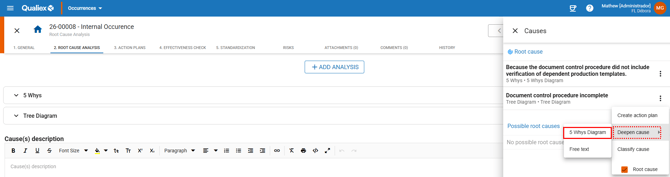
1. Click the **context menu** of one of the identified causes.
2. Select **“Deepen cause.”**
3. Choose the **“5 Whys Diagram”** option.
A new screen will open to add an additional tool. Click here to learn how to add the 5 Whys tool(placeholder).
The available and mandatory tools depend on the module’s configuration. Click here to learn more.
**Having difficulty using the 5 Whys methodology? Click here to learn more. (placeholder)**
- [Occurences](https://qualiex.forlogic.net/en/occurences?hsLang=en#main-content)
- [Treating an occurence guide](https://qualiex.forlogic.net/en/occurences?hsLang=en#treating-an-occurence-guide)
- [Register Occurence](https://qualiex.forlogic.net/en/occurences?hsLang=en#register-occurence)
- [Inbox](https://qualiex.forlogic.net/en/occurences?hsLang=en#inbox)
- [Cause analysis](https://qualiex.forlogic.net/en/occurences?hsLang=en#cause-analysis)
- [Action plan elaboration and execution](https://qualiex.forlogic.net/en/occurences?hsLang=en#action-plan-elaboration-and-execution)
- [Effectiveness check](https://qualiex.forlogic.net/en/occurences?hsLang=en#effectiveness-check)
- [Standardization and disclosure](https://qualiex.forlogic.net/en/occurences?hsLang=en#standardization-and-disclosure)
- [Overview](https://qualiex.forlogic.net/en/occurences?hsLang=en#overview)
- [General information](https://qualiex.forlogic.net/en/occurences?hsLang=en#general-information)
- [My Actions](https://qualiex.forlogic.net/en/occurences?hsLang=en#my-actions)
- [Cause classification](https://qualiex.forlogic.net/en/occurences?hsLang=en#cause-classification)
- [Occurences Categories](https://qualiex.forlogic.net/en/occurences?hsLang=en#occurences-categories)
- [Types of occurrences](https://qualiex.forlogic.net/en/occurences?hsLang=en#types-of-occurrences)
- [Module Configurations](https://qualiex.forlogic.net/en/occurences?hsLang=en#module-configurations)
- [Reports](https://qualiex.forlogic.net/en/occurences?hsLang=en#reports)
[](https://qualiex.com/)
[mailto:contato@forlogic.net](mailto:contato@forlogic.net)
Copyright © 2026