
1. Access the module
Click here to learn how to access the Occurrences module in Qualiex.
2. Locating the occurrence
Click the Occurrences tab, then right‑click the desired occurrence or open the context menu  and select “View.”
and select “View.”To perform the cause analysis of an occurrence, you must be either the person responsible for the occurrence or the person responsible for the cause‑analysis phase.

When you open the occurrence, the system automatically directs you to the current step that needs to be completed.
3. Adding the cause‑analysis tool
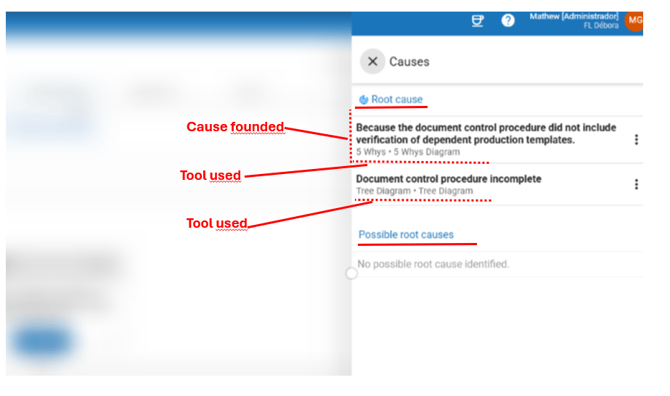
In the Root Cause Analysis step, click “Causes” to view the possible causes and root causes that have been identified.

A screen will open displaying the possible causes and root causes found.
To deepen the cause:
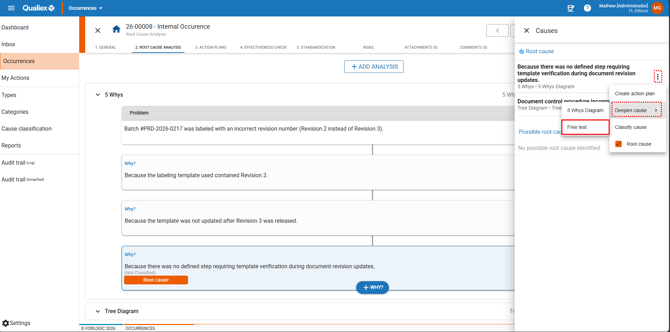
- Click the context menu
 of one of the identified causes
 - Select “Deepen cause.”
- Choose the “Free text” option.
A screen will open for you to describe the deeper analysis of the cause.
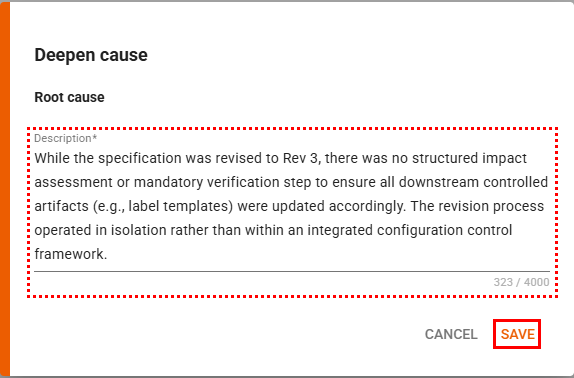
After completing the text, click “Save.”
The description will appear below the cause to which it was linked.