---
title: How to configure the cause‑analysis tools for occurrences in Qualiex?
description: How to configure the cause‑analysis tools for occurrences in Qualiex?
---
[Skip to content](https://qualiex.forlogic.net/en/how-to-configure-the-cause-analysis-tools-for-occurrences-in-qualiex#main-content)

Open main navigation
Close main navigation
How can we help you?
- There are no suggestions because the search field is empty.
1. [Qualiex | Knowledge Base](https://qualiex.forlogic.net/en?hsLang=en)
2. [Occurences](https://qualiex.forlogic.net/en/occurences?hsLang=en)
3. [Cause analysis](https://qualiex.forlogic.net/en/occurences?hsLang=en#cause-analysis)
# How to configure the cause‑analysis tools for occurrences in Qualiex?
To prevent an occurrence from recurring, it is essential to identify its root cause. Analysis tools support this process by organizing information strategically and facilitating a clear understanding of the problem. This leads to more accurate treatment and more effective solutions.
### 1. Access the module
Click here to learn how to access the *Occurrences* module in Qualiex.
### 2. Locating the settings of the Occurrences module
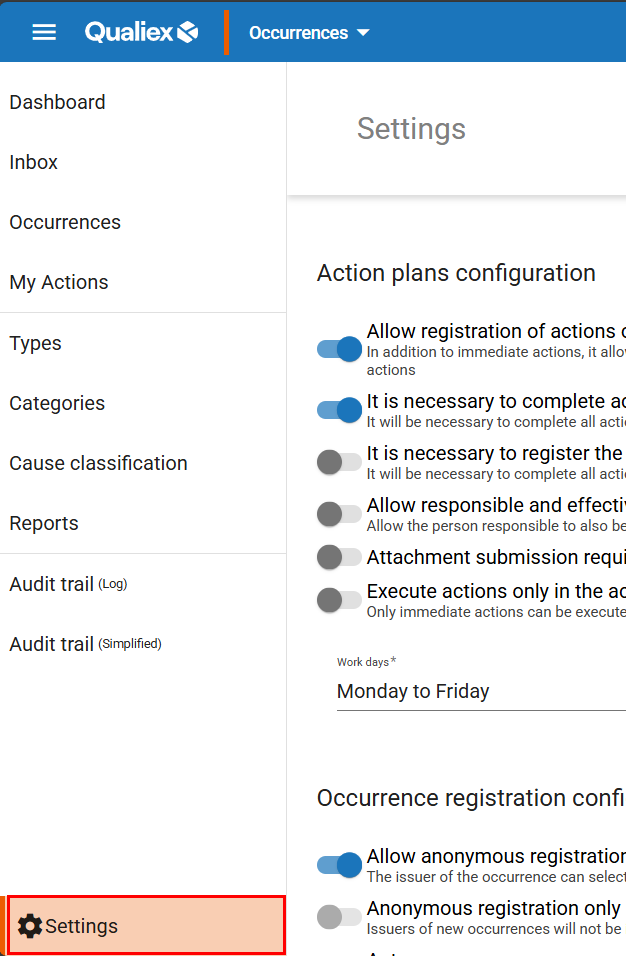
After accessing the module, locate and click the **“Settings”** tab, which is positioned in the lower‑left corner of the screen as the last tab.
To make changes within the Settings tab, the user must have the **“Manage”** permission.
This permission is defined under **Roles and Permissions > Settings**.
### **3. Understanding the configuration of analysis tools**
This group of settings refers to the configuration of the cause‑analysis tools used in occurrences, allowing you to define which tools will be used and whether their completion will be mandatory.
In Qualiex, the available tools are: **5 Whys**, **Tree Diagram**, and **Ishikawa Diagram**.
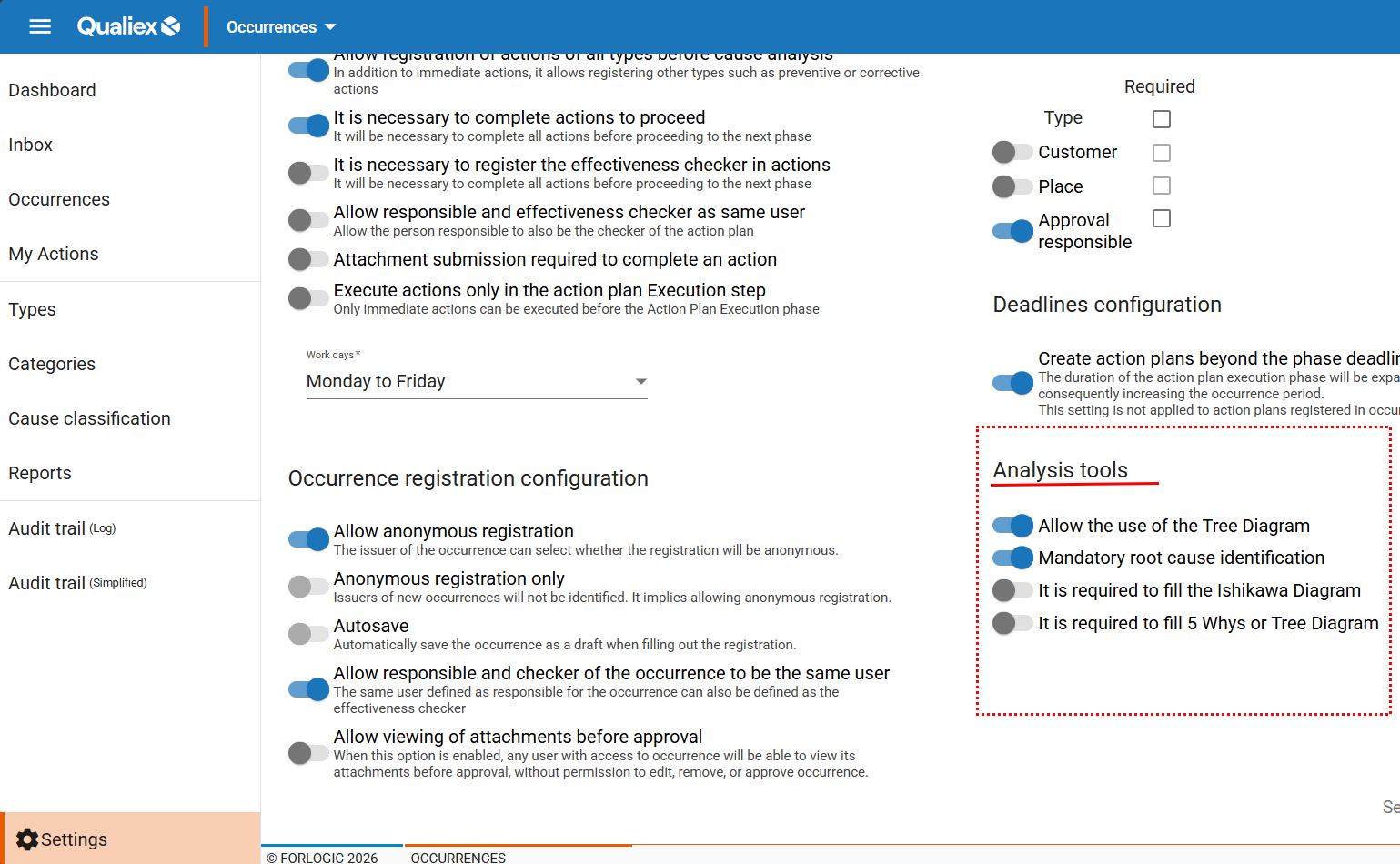
The button  indicates that the setting is enabled, while those marked with  are disabled. To enable or disable any option, simply click the respective buttons.
- **Allowed use of Tree Diagram:**When enabled, this option allows the use of the **Tree Diagram** tool during the cause‑analysis stage of an occurrence.
The Tree Diagram makes it possible to branch the analysis, mapping all variations and deviations related to the issue until reaching the root cause.
If the **“Allowed use of Tree Diagram”** option is not enabled, this tool will not appear during the occurrence treatment process.
- **Mandatory root‑cause identification:** When enabled, identifying the root cause becomes mandatory using either the **5 Whys** or **Ishikawa Diagram**.
If the **“Mandatory root‑cause identification”** option is enabled, the requirement applies specifically to the **Ishikawa Diagram** or **5 Whys** tools.
- **Mandatory completion of Ishikawa:**
If the root‑cause identification must be done using the **Ishikawa Diagram**, this setting must be enabled.
Without completing this tool, the responsible user will not be able to proceed to the next stage of the occurrence treatment.
- **Mandatory completion of 5 Whys or Tree Diagram:**
If the root‑cause identification must be performed using either the **5 Whys** or the **Tree Diagram**, this option must be enabled so that the responsible user cannot advance without completing the required tool.
If you choose to make **“mandatory completion of 5 Whys or Tree Diagram”** a requirement, you must still enable the option **“Allowed use of Tree Diagram.”**
After making the necessary adjustments, click .
*These changes will apply **only to new occurrences**.*
- [Occurences](https://qualiex.forlogic.net/en/occurences?hsLang=en#main-content)
- [Treating an occurence guide](https://qualiex.forlogic.net/en/occurences?hsLang=en#treating-an-occurence-guide)
- [Register Occurence](https://qualiex.forlogic.net/en/occurences?hsLang=en#register-occurence)
- [Inbox](https://qualiex.forlogic.net/en/occurences?hsLang=en#inbox)
- [Cause analysis](https://qualiex.forlogic.net/en/occurences?hsLang=en#cause-analysis)
- [Action plan elaboration and execution](https://qualiex.forlogic.net/en/occurences?hsLang=en#action-plan-elaboration-and-execution)
- [Effectiveness check](https://qualiex.forlogic.net/en/occurences?hsLang=en#effectiveness-check)
- [Standardization and disclosure](https://qualiex.forlogic.net/en/occurences?hsLang=en#standardization-and-disclosure)
- [Overview](https://qualiex.forlogic.net/en/occurences?hsLang=en#overview)
- [General information](https://qualiex.forlogic.net/en/occurences?hsLang=en#general-information)
- [My Actions](https://qualiex.forlogic.net/en/occurences?hsLang=en#my-actions)
- [Cause classification](https://qualiex.forlogic.net/en/occurences?hsLang=en#cause-classification)
- [Occurences Categories](https://qualiex.forlogic.net/en/occurences?hsLang=en#occurences-categories)
- [Types of occurrences](https://qualiex.forlogic.net/en/occurences?hsLang=en#types-of-occurrences)
- [Module Configurations](https://qualiex.forlogic.net/en/occurences?hsLang=en#module-configurations)
- [Reports](https://qualiex.forlogic.net/en/occurences?hsLang=en#reports)
[](https://qualiex.com/)
[mailto:contato@forlogic.net](mailto:contato@forlogic.net)
Copyright © 2026