---
title: How to clear filters and columns in Occurrences?
description: How to clear filters and columns in Occurrences?
---
[Skip to content](https://qualiex.forlogic.net/en/how-to-clear-filters-and-columns-in-occurrences#main-content)

Open main navigation
Close main navigation
How can we help you?
- There are no suggestions because the search field is empty.
1. [Qualiex | Knowledge Base](https://qualiex.forlogic.net/en?hsLang=en)
2. [Occurences](https://qualiex.forlogic.net/en/occurences?hsLang=en)
3. [Treating an occurence guide](https://qualiex.forlogic.net/en/occurences?hsLang=en#treating-an-occurence-guide)
# How to clear filters and columns in Occurrences?
In the **Occurrences** module, you can customize your view by applying column filters, changing data sorting, and selecting which columns to display. All these settings are automatically saved in your browser’s cache, ensuring that your preferences are kept for future visits.
If needed, you can restore the default view with just one click.
### **Accessing the module**
Click here to learn how to access the **Occurrences** module in Qualiex.(placeholder)
### **Clearing filters and columns**
To do this, in the **Occurrences** tab, right‑click on any column and select **“Restore default”** from the menu that appears.
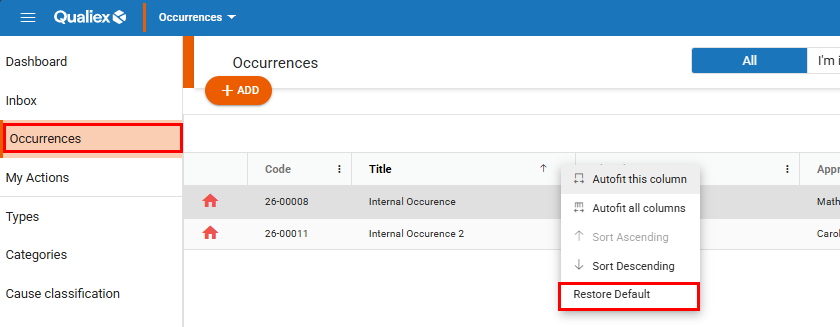
In this way, when selecting this option, it will:
- Sort the list in descending order by code (or according to the page’s default).
- Clear any applied filters.
- Restore the visible columns to the module’s default set and default order.
- Reset column width to the original default size.
- Remove any groupings.
*Changes made to the columns are temporarily saved in your browser’s cache.*
*If you access the system from another browser or computer, the view will return to the module’s default layout.*
- [Occurences](https://qualiex.forlogic.net/en/occurences?hsLang=en#main-content)
- [Treating an occurence guide](https://qualiex.forlogic.net/en/occurences?hsLang=en#treating-an-occurence-guide)
- [Register Occurence](https://qualiex.forlogic.net/en/occurences?hsLang=en#register-occurence)
- [Inbox](https://qualiex.forlogic.net/en/occurences?hsLang=en#inbox)
- [Cause analysis](https://qualiex.forlogic.net/en/occurences?hsLang=en#cause-analysis)
- [Action plan elaboration and execution](https://qualiex.forlogic.net/en/occurences?hsLang=en#action-plan-elaboration-and-execution)
- [Effectiveness check](https://qualiex.forlogic.net/en/occurences?hsLang=en#effectiveness-check)
- [Standardization and disclosure](https://qualiex.forlogic.net/en/occurences?hsLang=en#standardization-and-disclosure)
- [Overview](https://qualiex.forlogic.net/en/occurences?hsLang=en#overview)
- [General information](https://qualiex.forlogic.net/en/occurences?hsLang=en#general-information)
- [My Actions](https://qualiex.forlogic.net/en/occurences?hsLang=en#my-actions)
- [Cause classification](https://qualiex.forlogic.net/en/occurences?hsLang=en#cause-classification)
- [Occurences Categories](https://qualiex.forlogic.net/en/occurences?hsLang=en#occurences-categories)
- [Types of occurrences](https://qualiex.forlogic.net/en/occurences?hsLang=en#types-of-occurrences)
- [Module Configurations](https://qualiex.forlogic.net/en/occurences?hsLang=en#module-configurations)
- [Reports](https://qualiex.forlogic.net/en/occurences?hsLang=en#reports)
[](https://qualiex.com/)
[mailto:contato@forlogic.net](mailto:contato@forlogic.net)
Copyright © 2026