---
title: How to Change the Responsible Person or Deadline of an Occurrence?
description: How to Change the Responsible Person or Deadline of an Occurrence?
---
[Skip to content](https://qualiex.forlogic.net/en/how-to-change-the-responsible-person-or-deadline-of-an-occurrence#main-content)

Open main navigation
Close main navigation
How can we help you?
- There are no suggestions because the search field is empty.
1. [Qualiex | Knowledge Base](https://qualiex.forlogic.net/en?hsLang=en)
2. [Occurences](https://qualiex.forlogic.net/en/occurences?hsLang=en)
3. [General information](https://qualiex.forlogic.net/en/occurences?hsLang=en#general-information)
# How to Change the Responsible Person or Deadline of an Occurrence?
If an employee is on vacation and you need to continue the progress of an occurrence for which they are responsible, you can change the responsibility and even adjust the deadline for that step.
### Accessing the Module
Click here to learn how to access the **Occurrences** module in Qualiex.
### Changing Responsible Users and Deadlines
To change the responsible person or the deadline of an occurrence, the user must be the approver, the person responsible for the occurrence, or have the **“Edit All”** permission, defined under **Configurations > Roles and Permissions**.
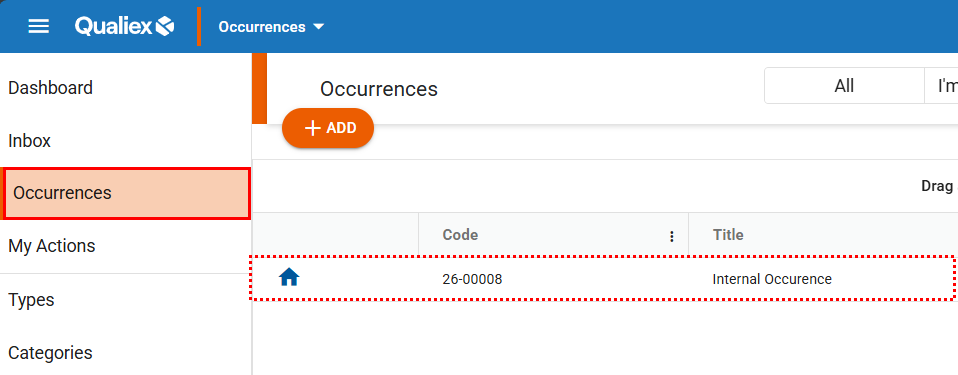
To change the responsible users or the deadline, first open the occurrence.
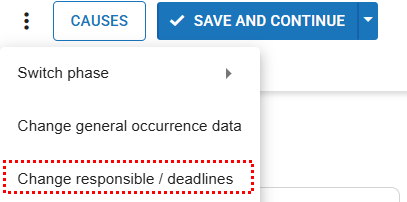
In the occurrence, click the context menu  and select the option “Change Responsible/Deadlines.”
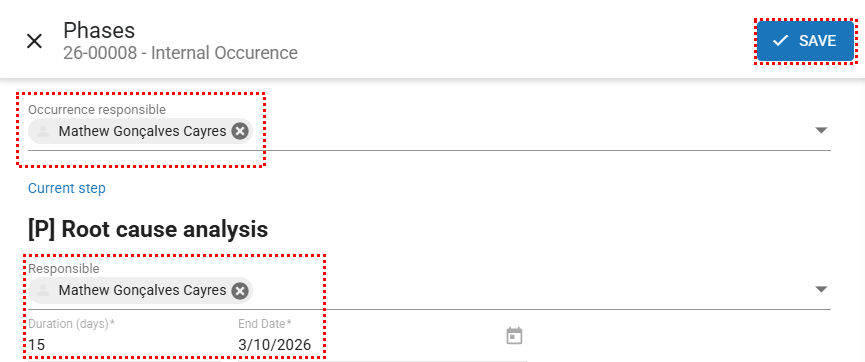
A screen will appear allowing you to change the responsible users and deadlines. Click the icon  to remove the user from the field and select the new responsible person. Fields marked with \* are mandatory. After making the changes, click “Save.”
- [Occurences](https://qualiex.forlogic.net/en/occurences?hsLang=en#main-content)
- [Treating an occurence guide](https://qualiex.forlogic.net/en/occurences?hsLang=en#treating-an-occurence-guide)
- [Register Occurence](https://qualiex.forlogic.net/en/occurences?hsLang=en#register-occurence)
- [Inbox](https://qualiex.forlogic.net/en/occurences?hsLang=en#inbox)
- [Cause analysis](https://qualiex.forlogic.net/en/occurences?hsLang=en#cause-analysis)
- [Action plan elaboration and execution](https://qualiex.forlogic.net/en/occurences?hsLang=en#action-plan-elaboration-and-execution)
- [Effectiveness check](https://qualiex.forlogic.net/en/occurences?hsLang=en#effectiveness-check)
- [Standardization and disclosure](https://qualiex.forlogic.net/en/occurences?hsLang=en#standardization-and-disclosure)
- [Overview](https://qualiex.forlogic.net/en/occurences?hsLang=en#overview)
- [General information](https://qualiex.forlogic.net/en/occurences?hsLang=en#general-information)
- [My Actions](https://qualiex.forlogic.net/en/occurences?hsLang=en#my-actions)
- [Cause classification](https://qualiex.forlogic.net/en/occurences?hsLang=en#cause-classification)
- [Occurences Categories](https://qualiex.forlogic.net/en/occurences?hsLang=en#occurences-categories)
- [Types of occurrences](https://qualiex.forlogic.net/en/occurences?hsLang=en#types-of-occurrences)
- [Module Configurations](https://qualiex.forlogic.net/en/occurences?hsLang=en#module-configurations)
- [Reports](https://qualiex.forlogic.net/en/occurences?hsLang=en#reports)
[](https://qualiex.com/)
[mailto:contato@forlogic.net](mailto:contato@forlogic.net)
Copyright © 2026