---
title: What is Occurrence Prioritization in Qualiex?
description: How to Change the Person Responsible for an Occurrence?
---
[Skip to content](https://qualiex.forlogic.net/en/how-to-change-the-person-responsible-for-an-occurrence#main-content)

Open main navigation
Close main navigation
How can we help you?
- There are no suggestions because the search field is empty.
1. [Qualiex | Knowledge Base](https://qualiex.forlogic.net/en?hsLang=en)
2. [Occurences](https://qualiex.forlogic.net/en/occurences?hsLang=en)
3. [General information](https://qualiex.forlogic.net/en/occurences?hsLang=en#general-information)
# What is Occurrence Prioritization in Qualiex?
**Prioritization Rules** allow occurrences to be **automatically classified** according to **criteria defined by the organization**, directing the treatment process based on the **assigned priority level**—whether due to urgency, differentiated deadlines, or the need for approval. This functionality streamlines decision-making, facilitates management, and ensures that **critical occurrences receive visibility and prompt resolution.**
### Accessing the module
Click here to learn how to access the **Occurrences** module in Qualiex.
### How to configure the Occurrence tab in the Prioritization Rule?
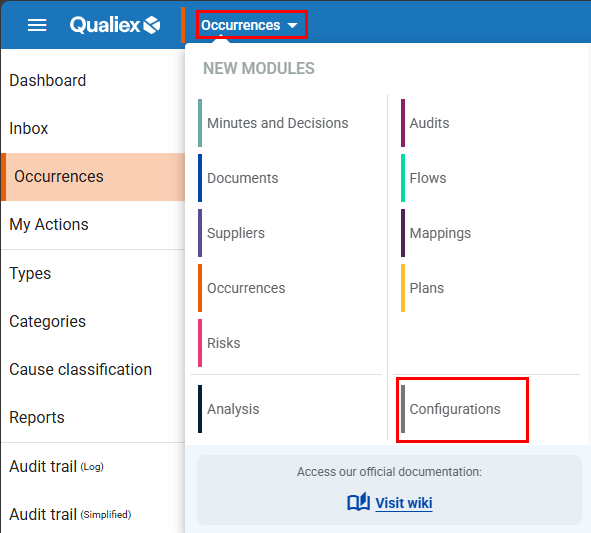
First, access **Configurations** by clicking the **Modules menu**, located in the **top navigation bar**.
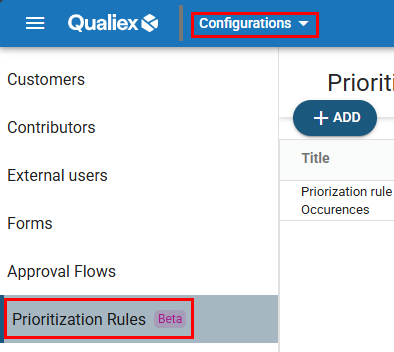
In the **Configurations** module, click on the **“Prioritization Rules”** tab.
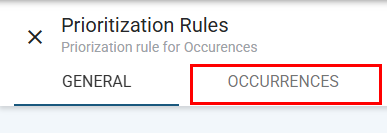
**Now, on the Prioritization Rules tab, click on **
Click here to learn how to create Prioritization Rules
### **Occurrences Tab**
Next to the **General** tab of the prioritization rule, you will find the **Occurrences** tab. This is where you configure **how the prioritization rule will be applied to occurrences** within the system.
To create a prioritization rule, the user must have the **“Manage prioritization rules”** permission, which is defined under **Configurations \> Roles and Permissions**.
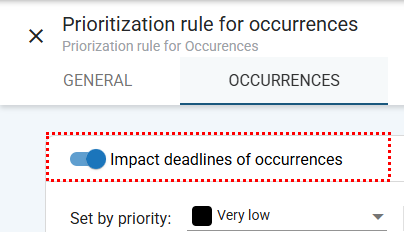
### **Impact occurrence deadlines**
Enable the **toggle** to activate this feature.
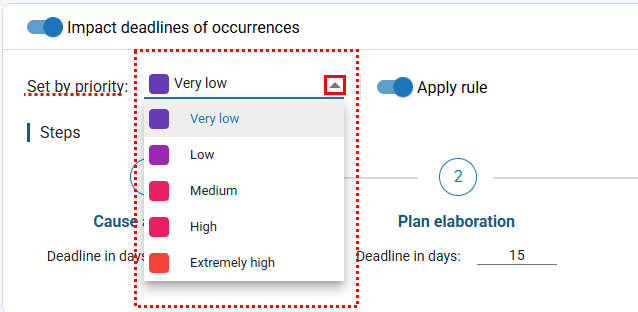
### **Select a priority from the drop-down field** (e.g., **Low, Medium, High**).
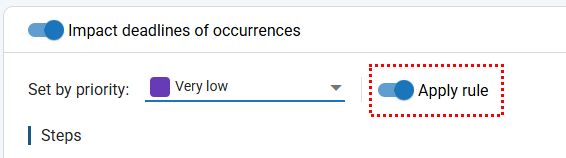
Enable the **toggle**  to activate this feature.
#### **Defining deadlines**
Define the **deadlines (in days)** for each stage of the occurrence (e.g., **Root Cause Analysis, Action Plan Elaboration**, etc.).
- The field accepts **integer values only**, from **1 to 999**.
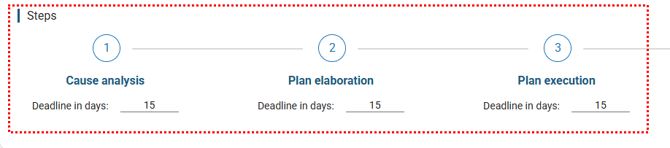
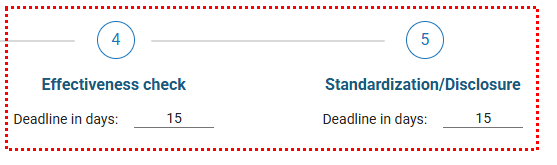
- The defined values will be **automatically applied** to the **Stages** tab of the occurrence and these values will be **view-only** during the **evaluation stage**.
### **Apply approval flow for deadlines and responsible persons**
Below this section, enable the **toggle**.
Once enabled, **any attempt to change deadlines or responsible parties** in the occurrence will **require approval** through an approval flow.
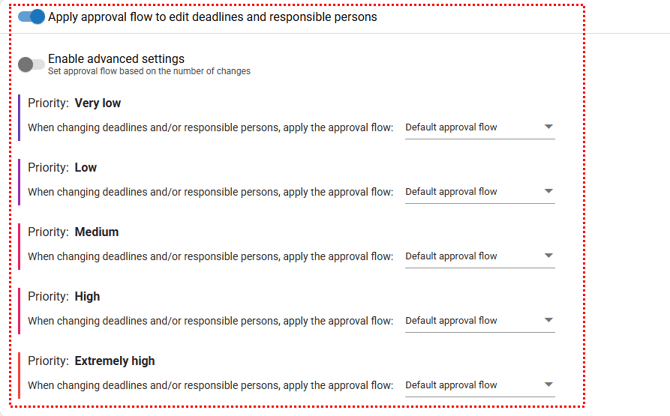
#### **Simple configuration**
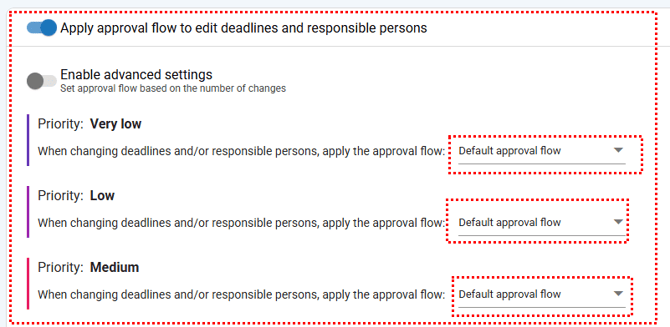
For each priority level (**Low, Medium, High**), select **one approval flow**.
#### 
#### **Advanced configuration**
Enable the **advanced configuration toggle**.
For each priority, define **multiple rules based on the number of changes**, for example:
- *“When deadlines and/or responsible parties are changed once, apply workflow X”*
- *“When changed two or more times, apply workflow Y”*
Rules and constraints:
- **Maximum of 5 rules per priority**
- The **first rule (1 change)** is **mandatory** and **cannot be deleted**
- Values must be **numeric, unique, and in ascending order**
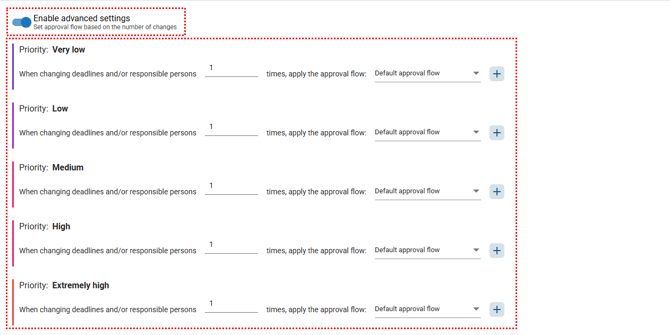
Approval workflows must be **previously configured** in the **Approval Flows** tab
#### **How does prioritization appear in the occurrence?**
To apply a prioritization rule to occurrences: Access the **Contracted Modules** menu and select the **Occurrences** module.
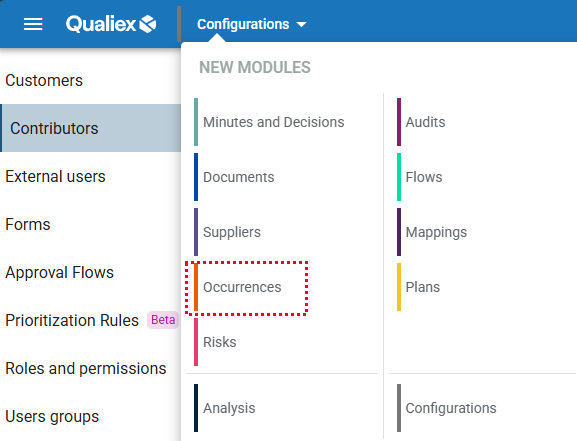
In the Occurrences module, access the **Categories** tab.
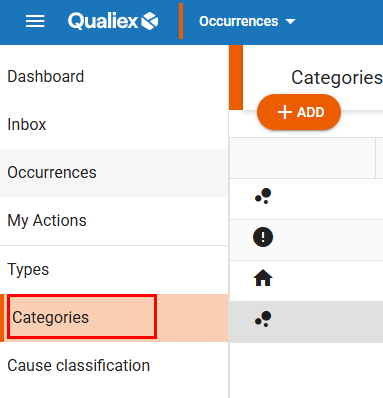
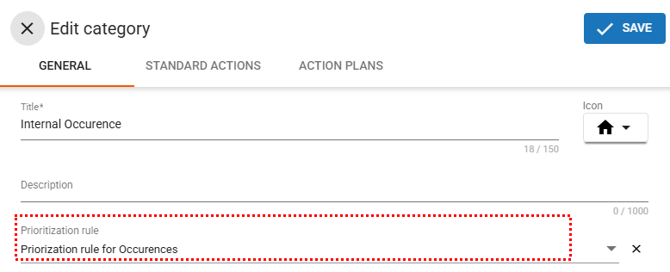
Create a new category or edit an existing one and **link the desired prioritization rule**.
To create or edit categories with prioritization rules, the user must have the permission **“Manage types, categories, and cause classifications”**, defined under **Configurations \> Roles and Permissions**.
#### **Category with a prioritization rule**
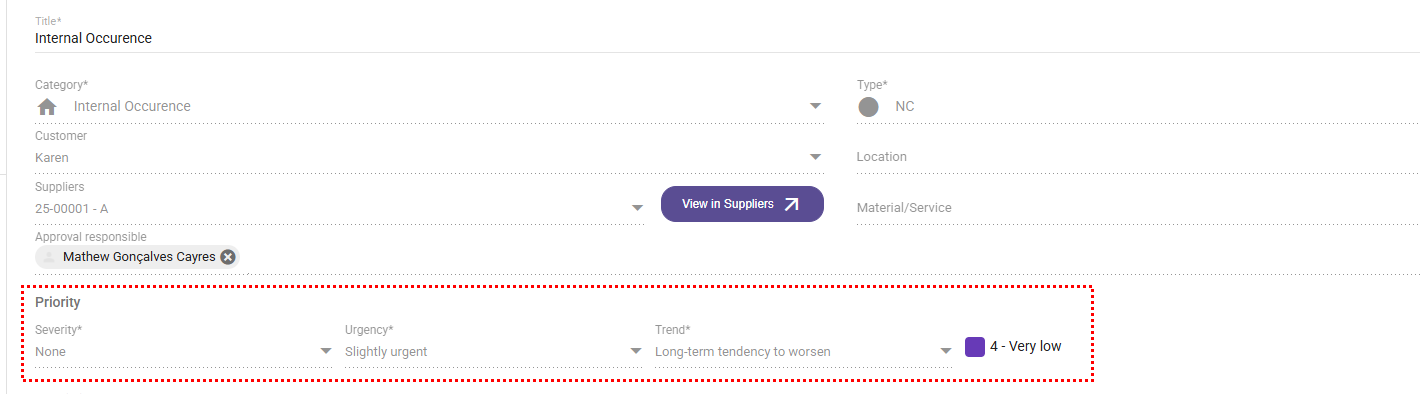
When registering or editing an occurrence, selecting a category that has an **active prioritization rule** will cause the **rule criteria to appear automatically** on the screen.
#### **Filling in the criteria**
When editing an occurrence linked to a category with a prioritization rule, the system displays fields such as **Severity, Urgency, and Trend** (or other criteria defined by the rule).
The user must select **one option for each criterion**.
#### **Priority calculation**
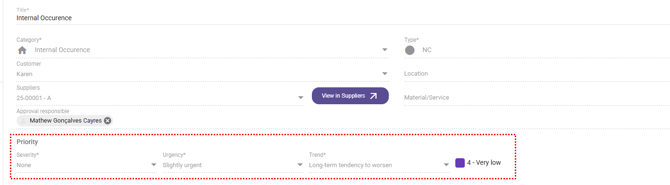
Based on the values selected, the system **automatically calculates the occurrence priority**.
As a result, when accessing the **General** tab of the occurrence, it is possible to view:
- The **criteria values**
- The calculated priority (**Low, Medium, or High**)
The priority can also be viewed:
- On the **occurrence registration screen**
- In the **occurrence listing columns**
****
****
****
#### **Visibility and editing of criteria**
- During **registration and evaluation**, prioritization criteria fields are **mandatory and editable**.
- In subsequent stages, these fields become **read-only**.
- **External users** with permission to register occurrences can also fill in these criteria at creation time.
- If the criteria are modified in future edits, the **priority is automatically recalculated**, reflecting the updated information.
#### **How does the “priority history” work?**
Each time an occurrence is **submitted for evaluation**, the system stores a **snapshot of the prioritization rule configuration** at that moment.
This ensures that:
- Even if the rule is changed later, the occurrence retains the **original prioritization data** used at submission.
- If the occurrence returns to **registration** or goes through **evaluation again**, a **new snapshot** is recorded using the most recent rule configuration.
#### **Display in the occurrence listing**
A column called **“Priority”** can be enabled on the main screen, allowing users to easily view the priority level of each occurrence.
- This column shows the **same priority value** displayed on the **General** tab of the occurrence.
- You can use this column to **sort occurrences by criticality**.
- If no prioritization rule is applied, the field remains **blank**.
Click here to learn how to **Add or Remove columns** in the Occurrences module.
#### **Benefits of this feature**
- Occurrences are **automatically classified** by the system.
- Demands can be prioritized based on the **actual severity and urgency** of each situation.
- **Deadlines are fully integrated** with approval workflows.
- Ensures **standardization, detailed history, and full traceability** throughout all stages.
- [Occurences](https://qualiex.forlogic.net/en/occurences?hsLang=en#main-content)
- [Treating an occurence guide](https://qualiex.forlogic.net/en/occurences?hsLang=en#treating-an-occurence-guide)
- [Register Occurence](https://qualiex.forlogic.net/en/occurences?hsLang=en#register-occurence)
- [Inbox](https://qualiex.forlogic.net/en/occurences?hsLang=en#inbox)
- [Cause analysis](https://qualiex.forlogic.net/en/occurences?hsLang=en#cause-analysis)
- [Action plan elaboration and execution](https://qualiex.forlogic.net/en/occurences?hsLang=en#action-plan-elaboration-and-execution)
- [Effectiveness check](https://qualiex.forlogic.net/en/occurences?hsLang=en#effectiveness-check)
- [Standardization and disclosure](https://qualiex.forlogic.net/en/occurences?hsLang=en#standardization-and-disclosure)
- [Overview](https://qualiex.forlogic.net/en/occurences?hsLang=en#overview)
- [General information](https://qualiex.forlogic.net/en/occurences?hsLang=en#general-information)
- [My Actions](https://qualiex.forlogic.net/en/occurences?hsLang=en#my-actions)
- [Cause classification](https://qualiex.forlogic.net/en/occurences?hsLang=en#cause-classification)
- [Occurences Categories](https://qualiex.forlogic.net/en/occurences?hsLang=en#occurences-categories)
- [Types of occurrences](https://qualiex.forlogic.net/en/occurences?hsLang=en#types-of-occurrences)
- [Module Configurations](https://qualiex.forlogic.net/en/occurences?hsLang=en#module-configurations)
- [Reports](https://qualiex.forlogic.net/en/occurences?hsLang=en#reports)
[](https://qualiex.com/)
[mailto:contato@forlogic.net](mailto:contato@forlogic.net)
Copyright © 2026