---
title: How to Associate Occurrences
description: How to Associate Occurrences
---
[Skip to content](https://qualiex.forlogic.net/en/how-to-associate-occurrences#main-content)

Open main navigation
Close main navigation
How can we help you?
- There are no suggestions because the search field is empty.
1. [Qualiex | Knowledge Base](https://qualiex.forlogic.net/en?hsLang=en)
2. [Occurences](https://qualiex.forlogic.net/en/occurences?hsLang=en)
3. [General information](https://qualiex.forlogic.net/en/occurences?hsLang=en#general-information)
# How to Associate Occurrences
The occurrence association feature helps group similar situations, reducing the number of occurrences that need to be individually analyzed by the team.
Often, a single cause generates multiple occurrences with the same effect. In such cases, it is beneficial to associate them so the treatment is concentrated in a single occurrence, since the root cause will likely be the same for all.
### Accessing the Module
Click here to learn how to access the **Occurrences** module in Qualiex.
### Associating Occurrences
In the Occurrences module, it is possible to perform associations regardless of the status of each occurrence, as long as they are **approved**.
To associate occurrences, the user must be the **responsible person** for the occurrence, or the **responsible person for the current step**, or the **approver of the current stage** in the approval flow, or have one of the following permissions:
- - **"Edit all"**, or
- **"Edit only from my location"**
These permissions are configured in **Configurations > Roles and Permissions**.
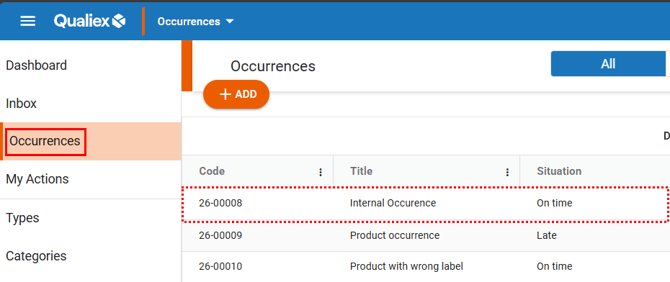
Within the **Occurrences** tab, locate and open the occurrence to which you want to associate other occurrences.
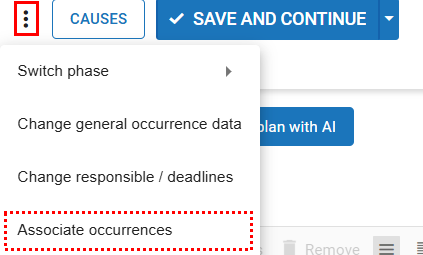
Inside the occurrence, click the icon to open the context menu  , and then select “Associate occurrences.”
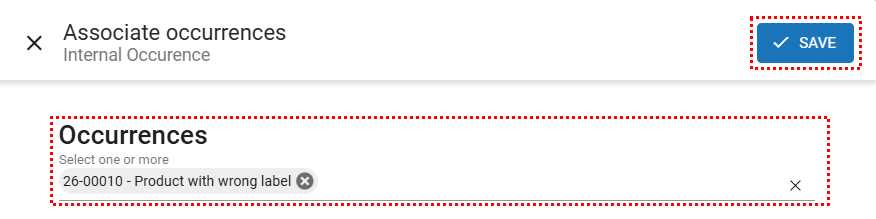
You can select one or more occurrences to associate. After selecting the occurrences that will be linked, click “Save.”
After saving, a window will appear for you to choose between the two available options:
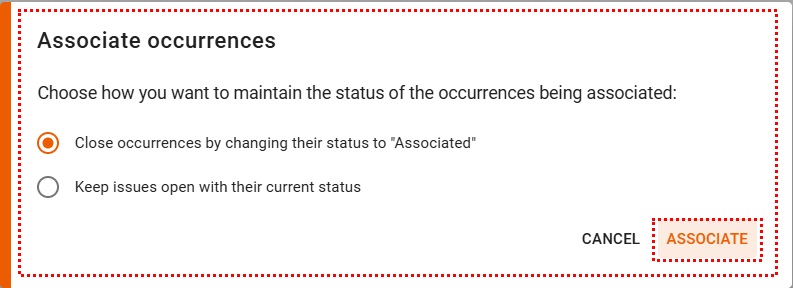
#### **Close the occurrences by changing their status to “Associated”**
When you select this option, the chosen occurrences will have their treatment process closed and will display the status **“Associated”** in the system.
All open actions linked to those occurrences will also be updated to the status **“Suspended.”**
This option is recommended when you want to **centralize the treatment of related cases into a single occurrence**, especially when they share the same root cause.

#### **Keep the occurrences open with their current status**
When you choose this option, the occurrences remain open and continue to be handled individually, but each one will display the association references in its general information.
This option is recommended when you need to correlate occurrences in the system **without losing the specific details and treatment path of each one**.
The linked occurrences can be viewed directly in the **General** tab.
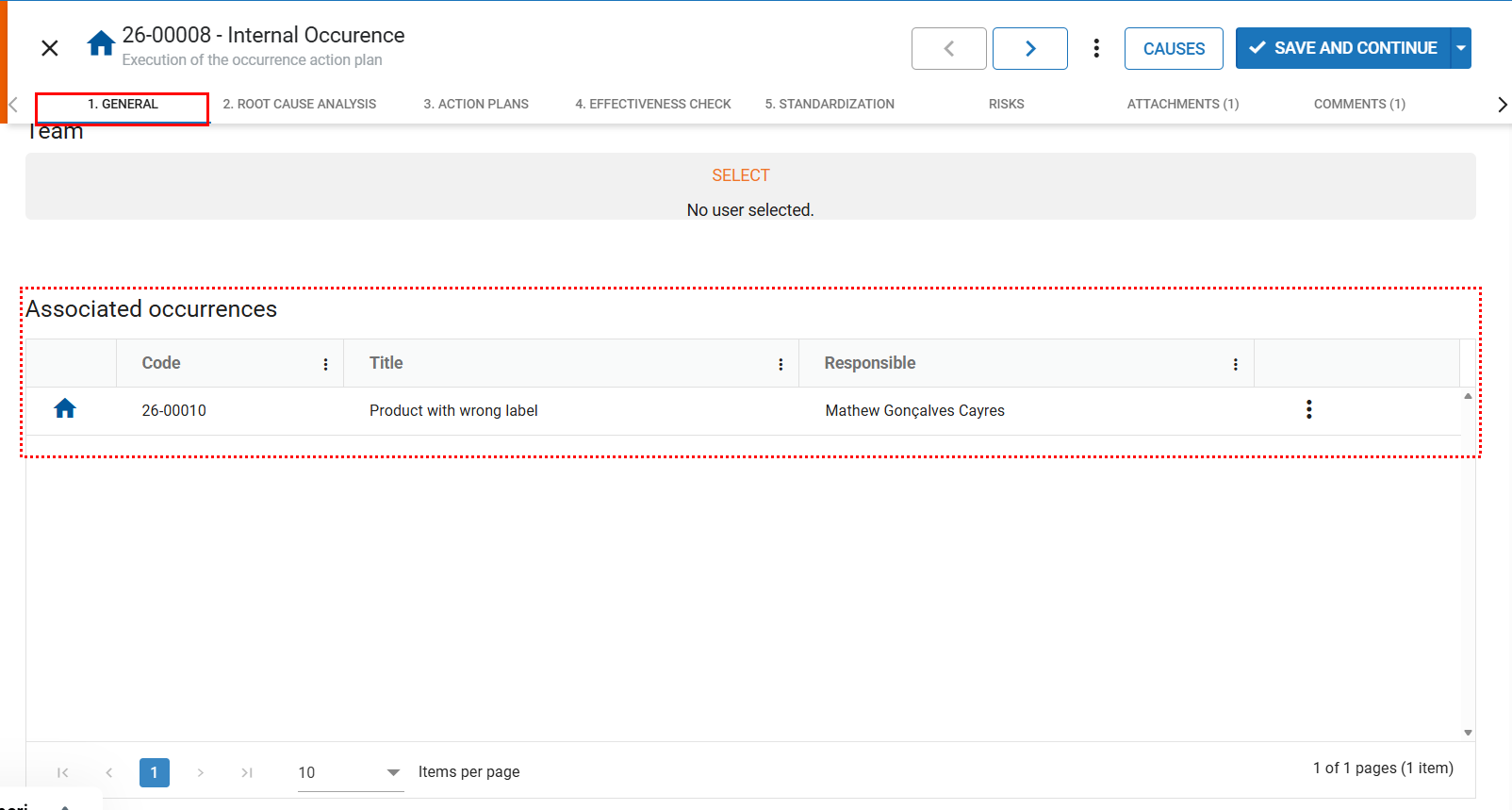
If you need to disassociate an occurrence that is marked as “Associated,” remember that the status will remain as “Associated” even after the disassociation. To change this status, you must reopen the occurrence.
Click here to learn how to reopen an occurrence.
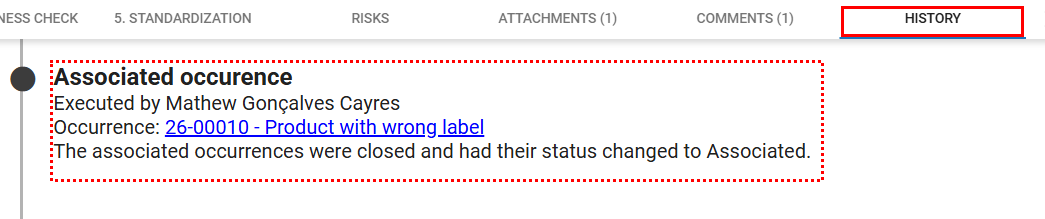
In the **History** tab of each occurrence, the association between them is recorded, ensuring full traceability of all actions performed throughout the process.
- [Occurences](https://qualiex.forlogic.net/en/occurences?hsLang=en#main-content)
- [Treating an occurence guide](https://qualiex.forlogic.net/en/occurences?hsLang=en#treating-an-occurence-guide)
- [Register Occurence](https://qualiex.forlogic.net/en/occurences?hsLang=en#register-occurence)
- [Inbox](https://qualiex.forlogic.net/en/occurences?hsLang=en#inbox)
- [Cause analysis](https://qualiex.forlogic.net/en/occurences?hsLang=en#cause-analysis)
- [Action plan elaboration and execution](https://qualiex.forlogic.net/en/occurences?hsLang=en#action-plan-elaboration-and-execution)
- [Effectiveness check](https://qualiex.forlogic.net/en/occurences?hsLang=en#effectiveness-check)
- [Standardization and disclosure](https://qualiex.forlogic.net/en/occurences?hsLang=en#standardization-and-disclosure)
- [Overview](https://qualiex.forlogic.net/en/occurences?hsLang=en#overview)
- [General information](https://qualiex.forlogic.net/en/occurences?hsLang=en#general-information)
- [My Actions](https://qualiex.forlogic.net/en/occurences?hsLang=en#my-actions)
- [Cause classification](https://qualiex.forlogic.net/en/occurences?hsLang=en#cause-classification)
- [Occurences Categories](https://qualiex.forlogic.net/en/occurences?hsLang=en#occurences-categories)
- [Types of occurrences](https://qualiex.forlogic.net/en/occurences?hsLang=en#types-of-occurrences)
- [Module Configurations](https://qualiex.forlogic.net/en/occurences?hsLang=en#module-configurations)
- [Reports](https://qualiex.forlogic.net/en/occurences?hsLang=en#reports)
[](https://qualiex.com/)
[mailto:contato@forlogic.net](mailto:contato@forlogic.net)
Copyright © 2026