---
title: How does the option to take ownership of occurrences work?
description: How does the option to take ownership of occurrences work?
---
[Skip to content](https://qualiex.forlogic.net/en/how-does-the-option-to-take-ownership-of-occurrences-work#main-content)

Open main navigation
Close main navigation
How can we help you?
- There are no suggestions because the search field is empty.
1. [Qualiex | Knowledge Base](https://qualiex.forlogic.net/en?hsLang=en)
2. [Occurences](https://qualiex.forlogic.net/en/occurences?hsLang=en)
3. [Inbox](https://qualiex.forlogic.net/en/occurences?hsLang=en#inbox)
# How does the option to take ownership of occurrences work?
It is now possible for an **occurrence to be assigned to a user group** and remain with the status **“Waiting for group”** until one of the group members **assumes responsibility**, before any treatment activities begin.
This feature is ideal for organizations in which the **individual occurrence owner is defined only after the occurrence has been approved**. In this scenario, you can configure a **user group to be temporarily responsible** and wait for one of its members to take ownership of the occurrence treatment.
### Accessing the module
Click here to learn how to access the **Occurrences** module in Qualiex.
### Configuring the option to take ownership of occurrences
To configure this option, the user must have the **“Approve occurrences”** permission, which is defined under **Configurations \> Roles and Permissions**.
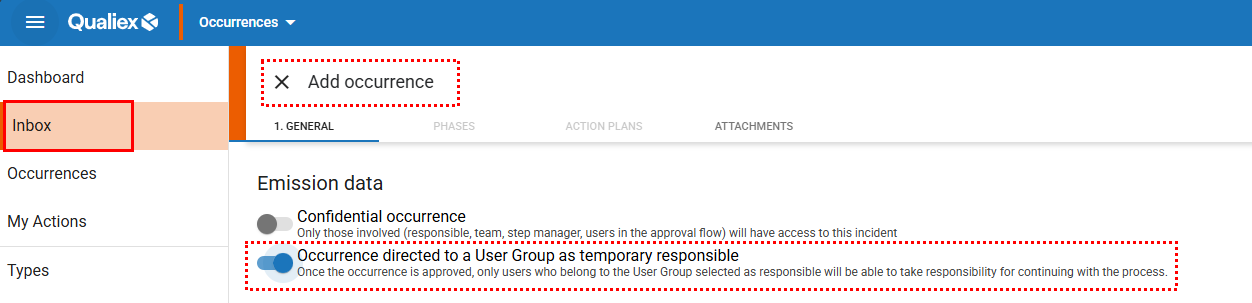
During the **occurrence approval process**, through the **Inbox**, you will find the option to **temporarily assign responsibility to a user group**.
Simply select **“Occurrence directed to a user group as temporary responsible”** when approving the occurrence.
This ensures flexibility in defining responsibility while maintaining **governance, traceability, and alignment**
****
When this option is enabled, the **“Treatment Details”** field will display the **registered teams for selection**, instead of individual employees.
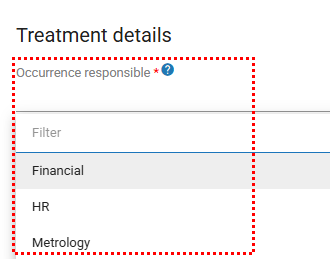
This feature is available **exclusively to Qualiex users**.
### **Occurrence behavior with the feature enabled**
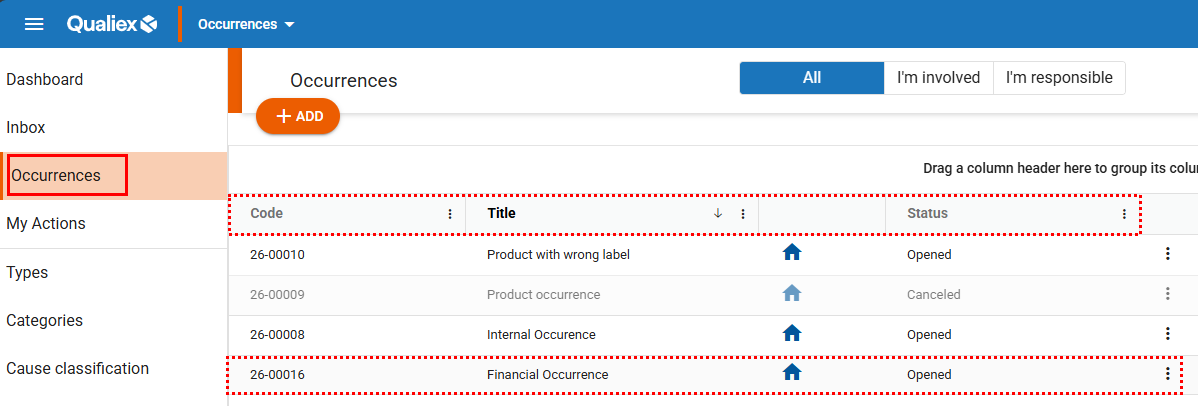
When accessing the **Occurrences** tab, the **Responsible** field is replaced by the **selection of a user group**, causing the occurrence to assume the status **“Waiting for group”**.
From this point on, **only involved users or members of the assigned group** are able to view and interact with the occurrence. The **group remains responsible** until one of its members formally takes ownership of the treatment.
Until an individual responsible party is defined, the **group will be displayed as the responsible entity** for both the **occurrence** and the **current stage.**
****
### **How to take ownership of an occurrence**
The action of **taking ownership of an occurrence** can be performed in two ways: through the **occurrence list** or **directly within the occurrence record**.
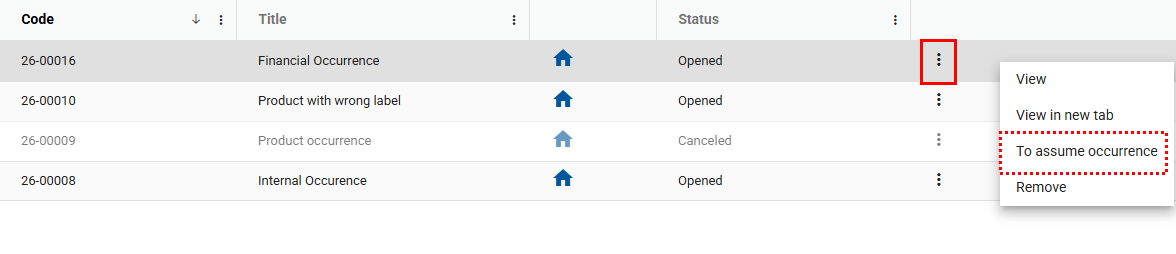
To take ownership via the **occurrence list**, locate the occurrence with the status **“Waiting for group”**. Then, **right‑click** on the occurrence or access the **context menu**.
If you are a **member of the responsible group**, the option **“To assume occurrence”** will be available. Selecting this option assigns the occurrence to you as the **individual responsible.**
****
Users with permission to **edit all occurrences** will **not be able to take ownership** of an occurrence **unless they are members of the assigned group**.
To take ownership **directly within the occurrence record**, open the occurrence and you will be taken straight to the **General** tab. In this case, the **“Save and advance”** button will be replaced by **“To assume and save”** on all tabs.
All fields will remain in **read-only mode** until a **member of the assigned group takes ownership** of the occurrence.
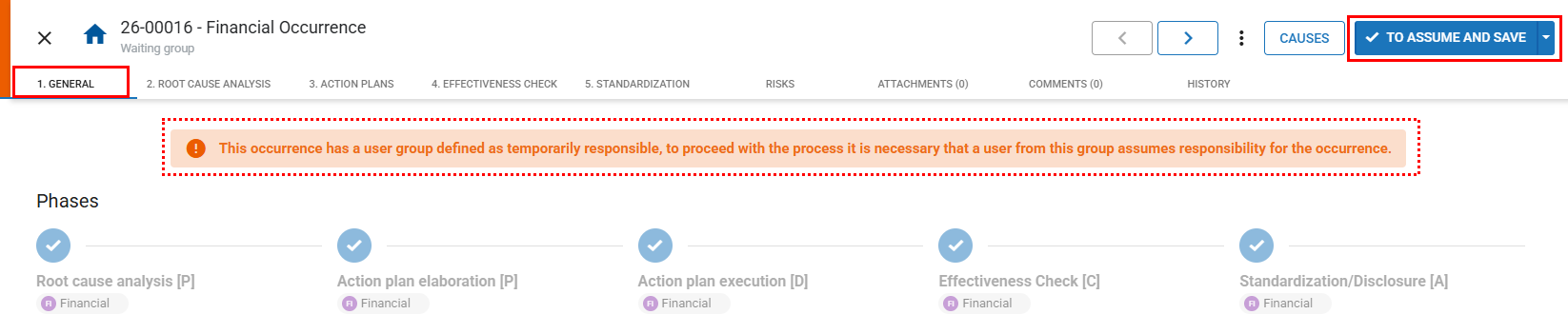
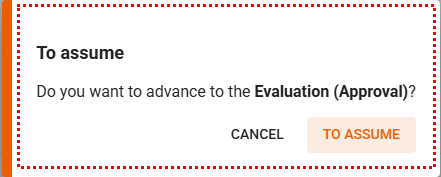
When you click **“To assume and save”**, a **new window will be displayed**, as shown in the image below:
### **If the group is removed**
If the **user group is deleted** before any member takes ownership of the occurrence, it will **automatically return to the Inbox**, with its status changed from **“Waiting for group”** to **“Waiting for evaluation”**.
This change is **logged in the history**, including the following details:
- **Status change:** Waiting for group → Waiting for evaluation
- **Justification:** Temporary responsible group removed
- **Action performed by:** User name
### **Important information**
- If a **group member is removed** or has their access **deactivated**, they **immediately lose the right to take ownership** of occurrences.
- If the group has **only one active member** and that member is removed, the occurrence will become **blocked** until another member is added to the group.
- The **group is also automatically populated** in the **stage owner fields**, when applicable, ensuring consistency, proper authorization, and alignment with permissions throughout the Quality Management System workflow.
- [Occurences](https://qualiex.forlogic.net/en/occurences?hsLang=en#main-content)
- [Treating an occurence guide](https://qualiex.forlogic.net/en/occurences?hsLang=en#treating-an-occurence-guide)
- [Register Occurence](https://qualiex.forlogic.net/en/occurences?hsLang=en#register-occurence)
- [Inbox](https://qualiex.forlogic.net/en/occurences?hsLang=en#inbox)
- [Cause analysis](https://qualiex.forlogic.net/en/occurences?hsLang=en#cause-analysis)
- [Action plan elaboration and execution](https://qualiex.forlogic.net/en/occurences?hsLang=en#action-plan-elaboration-and-execution)
- [Effectiveness check](https://qualiex.forlogic.net/en/occurences?hsLang=en#effectiveness-check)
- [Standardization and disclosure](https://qualiex.forlogic.net/en/occurences?hsLang=en#standardization-and-disclosure)
- [Overview](https://qualiex.forlogic.net/en/occurences?hsLang=en#overview)
- [General information](https://qualiex.forlogic.net/en/occurences?hsLang=en#general-information)
- [My Actions](https://qualiex.forlogic.net/en/occurences?hsLang=en#my-actions)
- [Cause classification](https://qualiex.forlogic.net/en/occurences?hsLang=en#cause-classification)
- [Occurences Categories](https://qualiex.forlogic.net/en/occurences?hsLang=en#occurences-categories)
- [Types of occurrences](https://qualiex.forlogic.net/en/occurences?hsLang=en#types-of-occurrences)
- [Module Configurations](https://qualiex.forlogic.net/en/occurences?hsLang=en#module-configurations)
- [Reports](https://qualiex.forlogic.net/en/occurences?hsLang=en#reports)
[](https://qualiex.com/)
[mailto:contato@forlogic.net](mailto:contato@forlogic.net)
Copyright © 2026